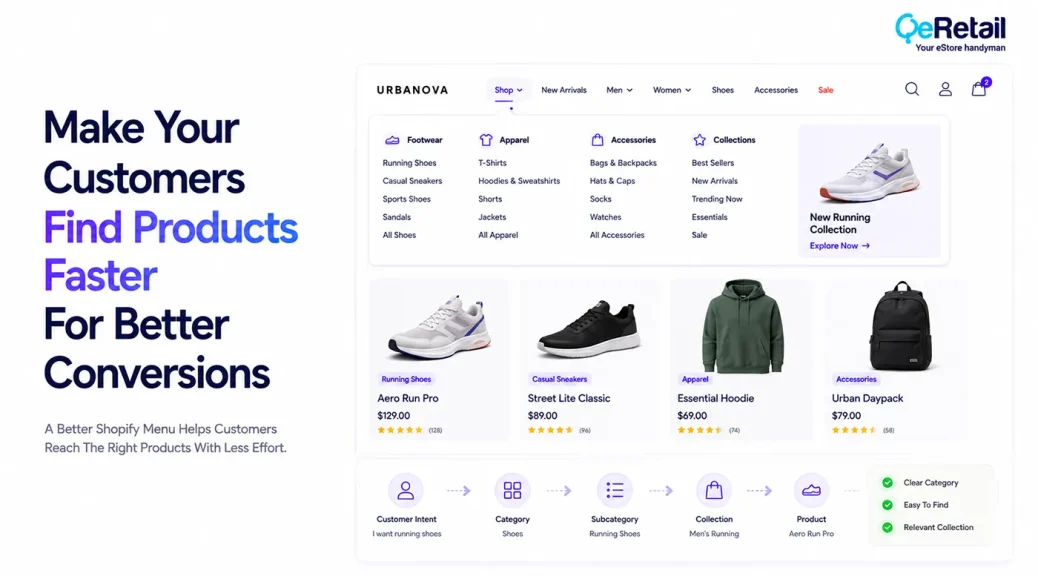
Customers visiting your Shopify store can still struggle to find the right products if the menu does not reflect how they actually shop, no matter how strong and attractive your store’s product range is.
As catalogs grow, store owners often add more collections, product types, campaigns, brands, and promotional links to the navigation. The menu becomes larger, but not necessarily more useful.
The problem is rarely that customers cannot see the menu.
It is that the menu may be organized around how the business manages products rather than how customers expect to find them.
Baymard Institute’s 2025 benchmark found that 58% of desktop sites and 67% of mobile sites had mediocre-to-poor homepage and category navigation UX. Its research also emphasizes that navigation is fundamental to product finding.
For Shopify stores, the menu should therefore be treated as part of the store’s product-discovery infrastructure, not simply as a collection of links.

Key Action Points Summary
- Organize menu categories around how customers search and shop
- Reduce unnecessary top-level menu items and overlapping categories
- Use clear product-focused labels instead of internal business terminology
- Build logical category and subcategory paths for large catalogs
- Make important product categories accessible on mobile
- Use mega menus or nested menus when the catalog genuinely requires them
- Connect navigation with collections, search, filters, and merchandising
- Test menu paths using real customer behaviour and product-finding tasks
- Review broken links, outdated collections, and unused menu items regularly
- Keep navigation structure consistent across desktop and mobile experiences
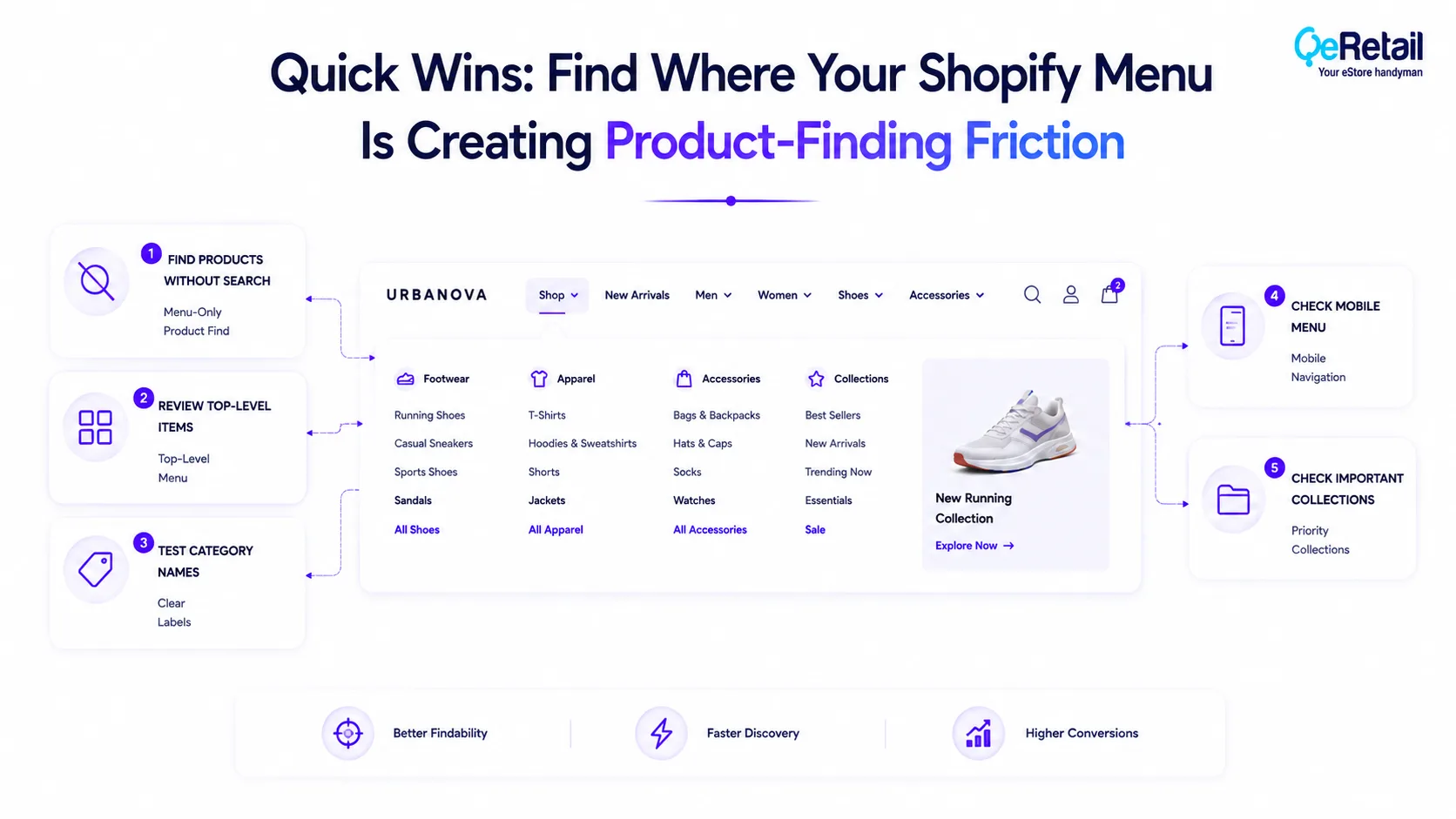
Quick Wins: Find Where Your Shopify Menu Is Creating Product-Finding Friction
You can uncover many navigation problems without changing your theme immediately. Start by following the paths customers use to reach products and look for moments where the menu creates unnecessary decisions.
1. Try Finding Products Without Using Search
Choose three important products and try to find them only through your menu and collections. Note how many clicks, backtracks, or category decisions are required.
2. Review Your Top-Level Menu Items
Look at every item in your main navigation and ask whether a new customer would immediately understand what they will find behind it. Remove links that do not contribute meaningfully to shopping.
3. Test Your Category Names
Ask someone unfamiliar with your store what they expect to find under each menu label. If their interpretation differs from your intended category, the label may need to change.
4. Check Your Mobile Menu
Open the navigation on a mobile device and attempt to reach several products. Look for excessive nesting, unclear back navigation, small tap targets, or categories hidden behind unnecessary intermediate levels.
5. Check Your Most Important Collections
Review whether your highest-value collections are easy to reach from the main navigation. Products that generate strong demand should not be buried several levels deep without a clear reason.
5 Changes To Your Shopify Menu That Help Customers Find Products Faster
A good Shopify menu should reduce the distance between what the customer wants and where that product lives.
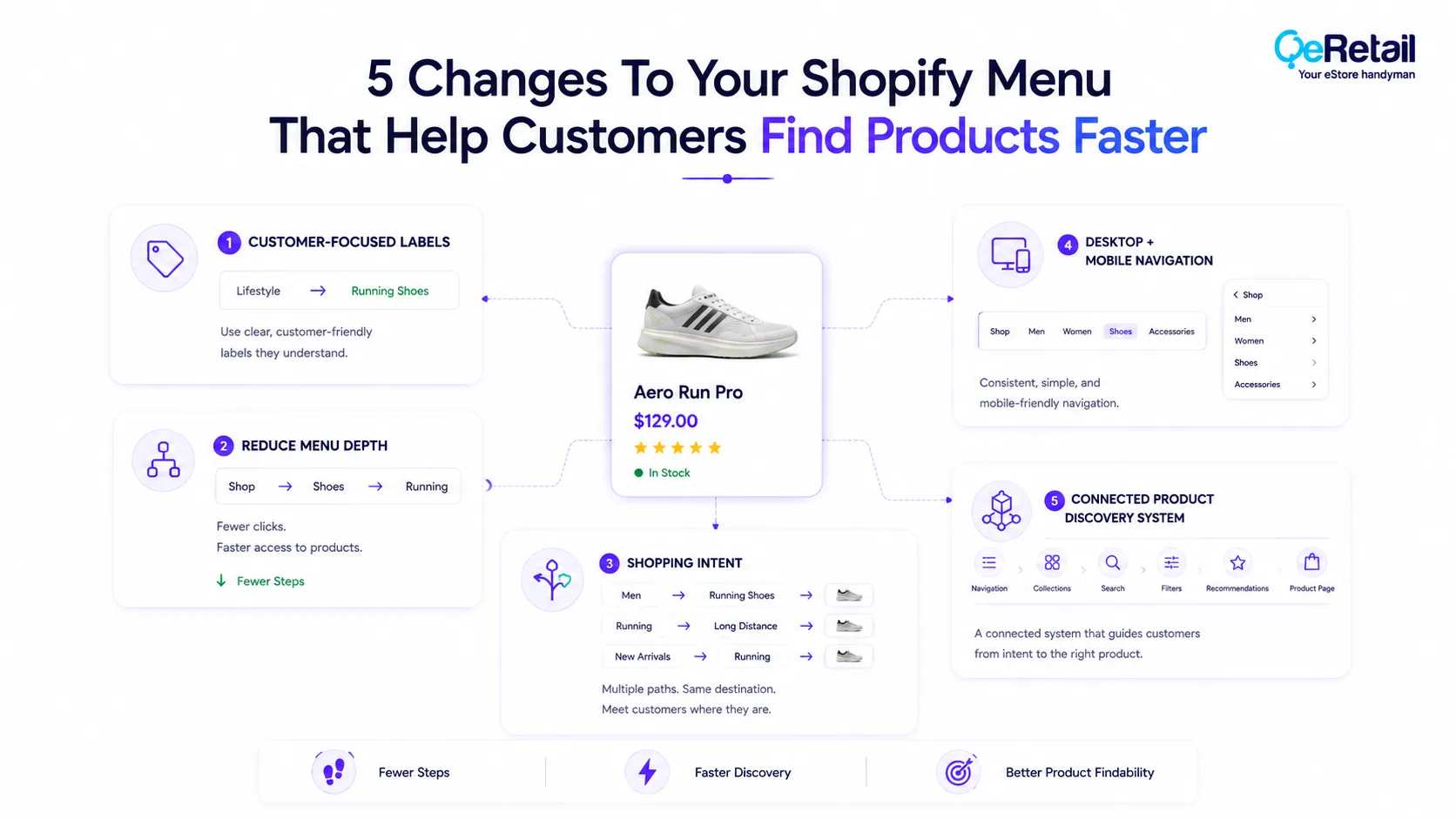
That requires more than rearranging links. The underlying information architecture, collection structure, labels, responsive behaviour, and data behind the navigation all influence how quickly customers can find products.
These five changes focus on improving the menu at both the customer-facing and technical levels.
1. Replace Internal Categories With Customer-Focused Menu Labels
Store owners often build navigation using terminology that makes sense internally.
A merchandising team may understand terms such as “Lifestyle,” “Essentials,” “Core Range,” or “Performance Collection,” but a first-time shopper may have no idea what products those categories contain.
Customers should be able to scan your navigation and make an accurate prediction about where a product will be found.
What Should Shopify Stores Do To Improve?
- Use product-focused language customers already understand
- Replace ambiguous internal terminology with descriptive labels
- Group products according to customer needs and shopping intent
- Test category labels with people unfamiliar with the store
- Keep naming conventions consistent across collections and navigation
Quick Win:
Choose your five most important menu labels and ask someone unfamiliar with your store what products they expect to find under each one. Rewrite any label that creates significant uncertainty.
2. Reduce Menu Depth And Remove Unnecessary Navigation Layers
A growing catalog often creates a predictable problem, and that is every new product group becomes another submenu.
Customers may have to navigate from Shop to Category to Subcategory to Product Type to Collection before reaching a useful product list.
Adding more levels does not automatically create better organization. It can instead force customers to make more decisions before they can even evaluate products.
What Should Shopify Stores Do To Improve?
- Remove unnecessary intermediate category levels
- Keep high-value product categories closer to the top level
- Combine overlapping categories where appropriate
- Use subcategories only when they help customers narrow choices
- Review the number of navigation steps required to reach important products
Quick Win:
Pick ten products that are important to your business and reach each one using only the main menu. Record the number of navigation levels required. Investigate any product that takes significantly more steps than similar products.
3. Build Navigation Around Shopping Intent, Not Just Product Types
Customers do not always enter a store knowing the exact product they want.
Someone shopping for running shoes may begin with Men’s, Running, Trail, New Arrivals, or even a use-case such as Long-Distance Running.
That means a product can logically belong in more than one discovery path.
For stores with broader catalogs, this is where menu architecture becomes more than a visual design task. Products, collections, tags, attributes, merchandising rules, and navigation need to work together.
What Should Shopify Stores Do To Improve?
- Identify the main ways customers search for your products
- Create collections around meaningful shopping intents
- Allow important products to be discovered through multiple relevant paths
- Connect navigation categories with appropriate product attributes
- Use analytics to identify common product-discovery journeys
Quick Win:
Look at your search terms, top collections, and most-viewed products. Identify three common ways customers appear to shop your catalog and check whether your menu supports those paths directly.
4. Make Your Desktop And Mobile Menus Work Differently
A menu that works well on desktop can become frustrating when compressed into a mobile drawer.
Desktop users can scan multiple categories simultaneously, while mobile shoppers usually interact with a narrower, sequential menu.
This makes hierarchy particularly important on mobile.
What Should Shopify Stores Do To Improve?
- Expose important product categories early in the mobile menu
- Reduce unnecessary mobile navigation levels
- Make back and expansion interactions obvious
- Ensure menu links and tap targets work comfortably on smaller screens
- Test important product-finding paths separately on mobile and desktop
Quick Win:
On your phone, open the menu and try to find five important products without using search. Record every unnecessary expansion, backtrack, or unclear category interaction.
5. Turn The Menu Into A Connected Product-Discovery System
Your navigation menu does not operate independently.
It connects customers to collections, product listings, search, filters, recommendations, merchandising rules, and eventually product pages.
A menu can therefore look perfectly organized while still producing a poor shopping experience if the underlying collections are outdated, filters do not match the category, or links lead to irrelevant product groups.
For larger Shopify stores, this can require more than editing menu items manually. Product data, collection rules, search logic, and theme components may all need to work together.
What Should Shopify Stores Do To Improve?
- Connect menu categories to accurate and relevant collections
- Review whether collection filters match customer needs
- Keep navigation links synchronized with catalog changes
- Use search and navigation together for product discovery
- Monitor product-finding behaviour to identify navigation gaps
Quick Win:
Select your ten most important menu links and open each one as a customer. Check whether the destination contains the products customers would reasonably expect and whether the next filtering or sorting step helps them narrow the selection.
How QeRetail Helps Improve Shopify Navigation And Product Discovery
QeRetail helps Shopify businesses improve navigation architecture, product discovery, collection structures, and storefront interactions so customers can reach relevant products with less effort.
1. Shopify UX And Navigation Optimization
We analyze menu structures, category hierarchies, collection paths, mobile navigation, and customer journeys to identify where navigation is creating unnecessary product-finding friction.
2. Shopify Theme And Menu Customization
Our team can customize Shopify themes to create more effective dropdown menus, mega menus, mobile navigation systems, sticky navigation, category interfaces, and other storefront components.
3. Product Catalog And Information Architecture
We help businesses structure products, collections, categories, attributes, and navigation paths so the storefront reflects how customers actually browse and compare products.
4. Search, Filtering And Product Discovery
We connect navigation with search, filters, sorting, recommendations, and other product-discovery functionality to create a more connected shopping experience.
5. Shopify API And Third-Party Integrations
We integrate Shopify with search platforms, product-data systems, analytics tools, inventory systems, and other technologies when standard Shopify functionality does not provide the required discovery experience.
6. Mobile Storefront Optimization
We review and improve mobile navigation behaviour, menu interactions, responsive layouts, and product-finding journeys so customers can browse large catalogs more effectively on smaller screens.

Conclusion
Customers rarely think about your Shopify menu as an information architecture system.
They simply expect to know where to go next.
When categories are clear, navigation paths are logical, important products are easy to reach, and mobile interactions work as expected, customers can spend more time evaluating products and less time figuring out how the store is organized.
QeRetail helps Shopify businesses identify these navigation gaps and turn them into practical improvements through Shopify customization, UX optimization, product-discovery solutions, integrations, and conversion-focused digital services.
Contact us to identify where your Shopify menu may be making product discovery harder than it needs to be.
Frequently Asked Questions
How Many Items Should A Shopify Menu Have?
How Can I Make My Shopify Menu Easier To Navigate?
Should Shopify Stores Use A Mega Menu?
Should Product Categories Be Directly Visible In The Mobile Menu?
Can Custom Shopify Development Improve Product Discovery?
Table of Contents