
Your Shopify store may attract qualified traffic, showcase the right products, and deliver a seamless shopping experience. Yet, a single inventory mismatch at checkout can undo all those efforts.
Imagine a customer adding their favorite product to the cart, completing the checkout process, and then discovering the item is no longer available. Whether it results in an order cancellation, delayed fulfillment, or refund, the experience leaves customers frustrated and less likely to return.
Nearly two-thirds of shoppers are less likely to trust a business after experiencing overselling, making inventory accuracy a critical factor.
As Shopify businesses expand across multiple warehouses, retail locations, marketplaces, and fulfillment partners, maintaining accurate inventory becomes increasingly challenging. Even a few seconds of delay in stock synchronization can lead to overselling, checkout failures, and operational disruptions.
While Shopify offers built-in inventory management capabilities, inventory accuracy depends on how effectively your store communicates with external systems such as ERP, warehouse management systems (WMS), point-of-sale (POS), and third-party logistics (3PL) providers.
Resolving out-of-stock glitches is not just about preventing overselling; it is about protecting customer trust, improving operational efficiency, and ensuring every purchase journey ends successfully.

Key Considerations
Before optimizing your Shopify inventory workflow, keep these key considerations in mind:
- Synchronize inventory across all sales channels in real time.
- Eliminate manual inventory updates wherever possible.
- Monitor inventory changes between ERP, WMS, POS, and Shopify.
- Validate inventory before customers complete checkout.
- Configure safety stock for high-demand products.
- Track failed inventory synchronization events.
- Regularly audit inventory accuracy across systems.
- Review third-party integrations affecting stock updates.
- Test checkout during peak sales periods.
Quick Wins: Reduce Inventory Errors Before They Reach Checkout
Before investing in advanced inventory solutions, start with these practical improvements.
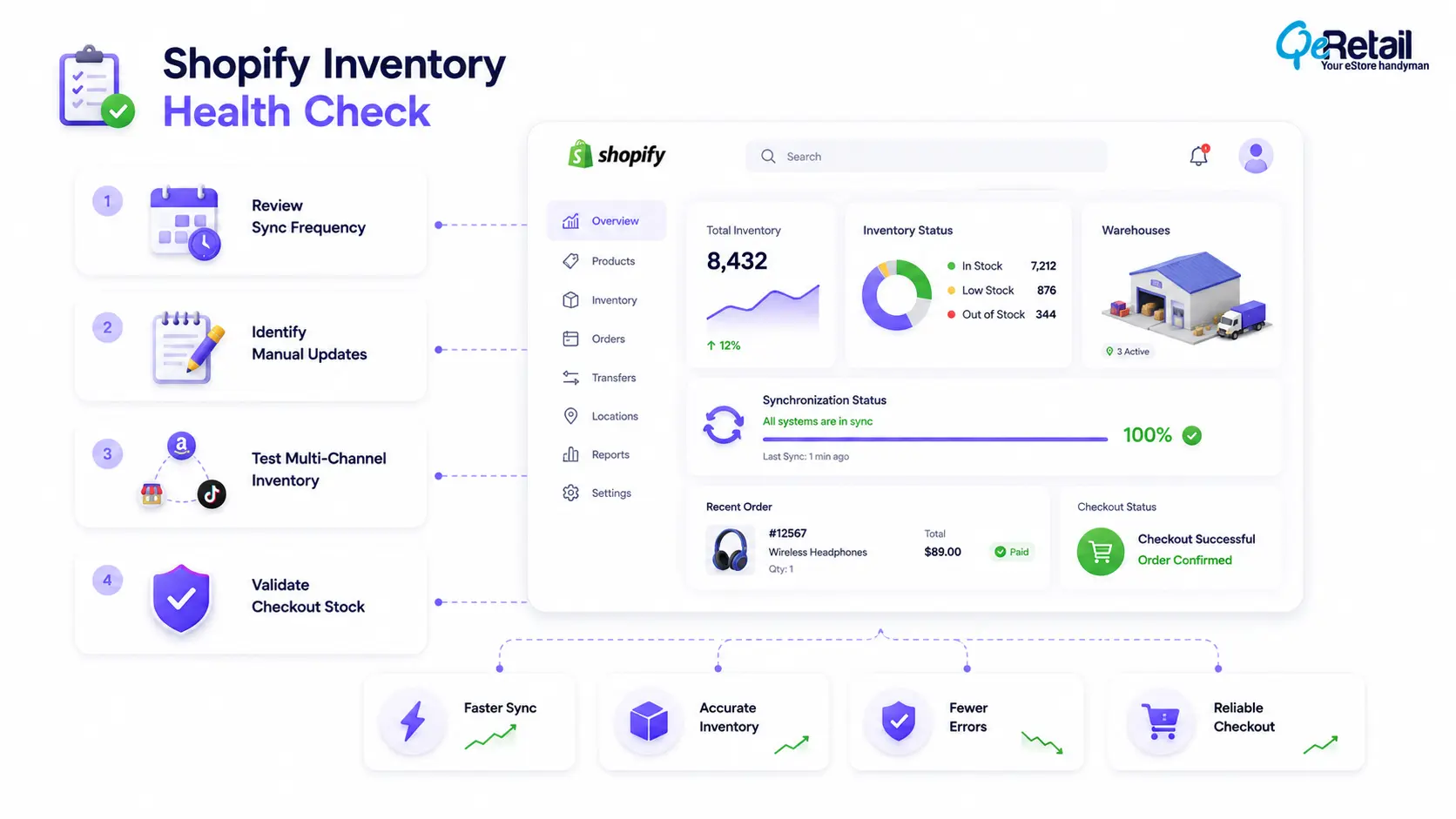
1. Review Inventory Synchronization Frequency
Check how frequently your connected systems update Shopify inventory.
If stock updates occur every few minutes instead of instantly, customers may purchase products that are already unavailable.
2. Identify Manual Inventory Processes
Review whether employees manually adjust inventory after receiving stock, processing returns, or fulfilling orders.
Reducing manual intervention minimizes the risk of inaccurate stock counts.
3. Test Inventory Across Multiple Sales Channels
Purchase the same product from different channels to verify inventory updates correctly.
This simple exercise often reveals synchronization delays before customers encounter them.
What Is an Out-of-Stock Checkout Glitch?
An out-of-stock checkout glitch occurs when a customer successfully adds a product to their cart, but the product becomes unavailable before the purchase is completed.
This situation usually happens because inventory changes faster than connected systems can synchronize.
For example, a product may sell through a retail store, marketplace, or warehouse while Shopify continues displaying it as available. By the time the customer reaches checkout, the inventory has already been exhausted.
These inconsistencies become more common for businesses managing:
- Multiple warehouses
- Omnichannel sales
- High-demand product launches
- Flash sales
- Seasonal promotions
- Marketplace integrations
This challenge is more widespread than many merchants realize. Research cited by Shopify shows the average retailer achieves only about 63% inventory accuracy, leaving significant room for stock discrepancies that can affect checkout reliability.
Why Out-of-Stock Glitch Happens?
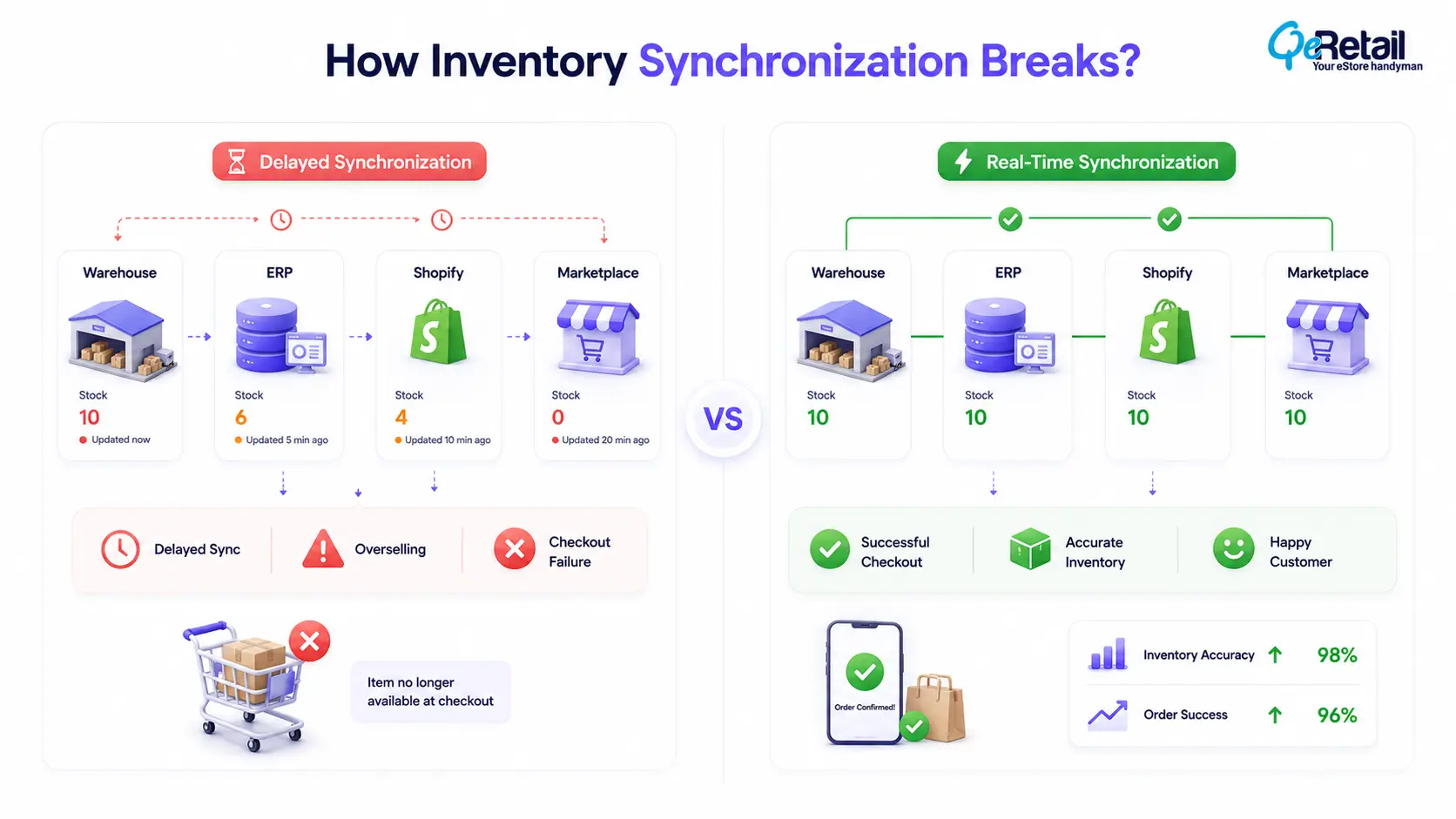
1. Delayed Inventory Synchronization
One of the most common reasons behind checkout inventory issues is delayed synchronization between Shopify and connected business systems.
Inventory may update immediately in a warehouse or ERP, but those changes often take several minutes to appear in Shopify or connected marketplaces.
During busy sales periods, even a short delay can allow multiple customers to purchase the same remaining item.
2. Selling Across Multiple Channels
Many Shopify merchants sell through marketplaces, retail stores, social commerce platforms, and mobile applications.
Without a centralized inventory source, every channel maintains its own version of available stock until synchronization occurs.
3. Manual Inventory Updates
Some businesses continue relying on spreadsheets or manual adjustments to manage inventory.
While manageable at smaller scales, manual processes become increasingly unreliable as order volumes grow.
Missed updates, incorrect stock adjustments, or delayed data entry can quickly result in inaccurate inventory being displayed to customers.
4. Integration Issues Between Business Systems
Many stores rely on ERP platforms, warehouse management systems, fulfillment providers, accounting software, and third-party applications to manage inventory.
If any integration experiences delays, API failures, or configuration issues, stock information can become inconsistent across systems.
5 Ways To Solve the Out-of-Stock Glitch
Resolving checkout inventory issues requires more than tracking stock levels. It involves creating a connected inventory ecosystem where every inventory movement is reflected across all business systems in near real time.
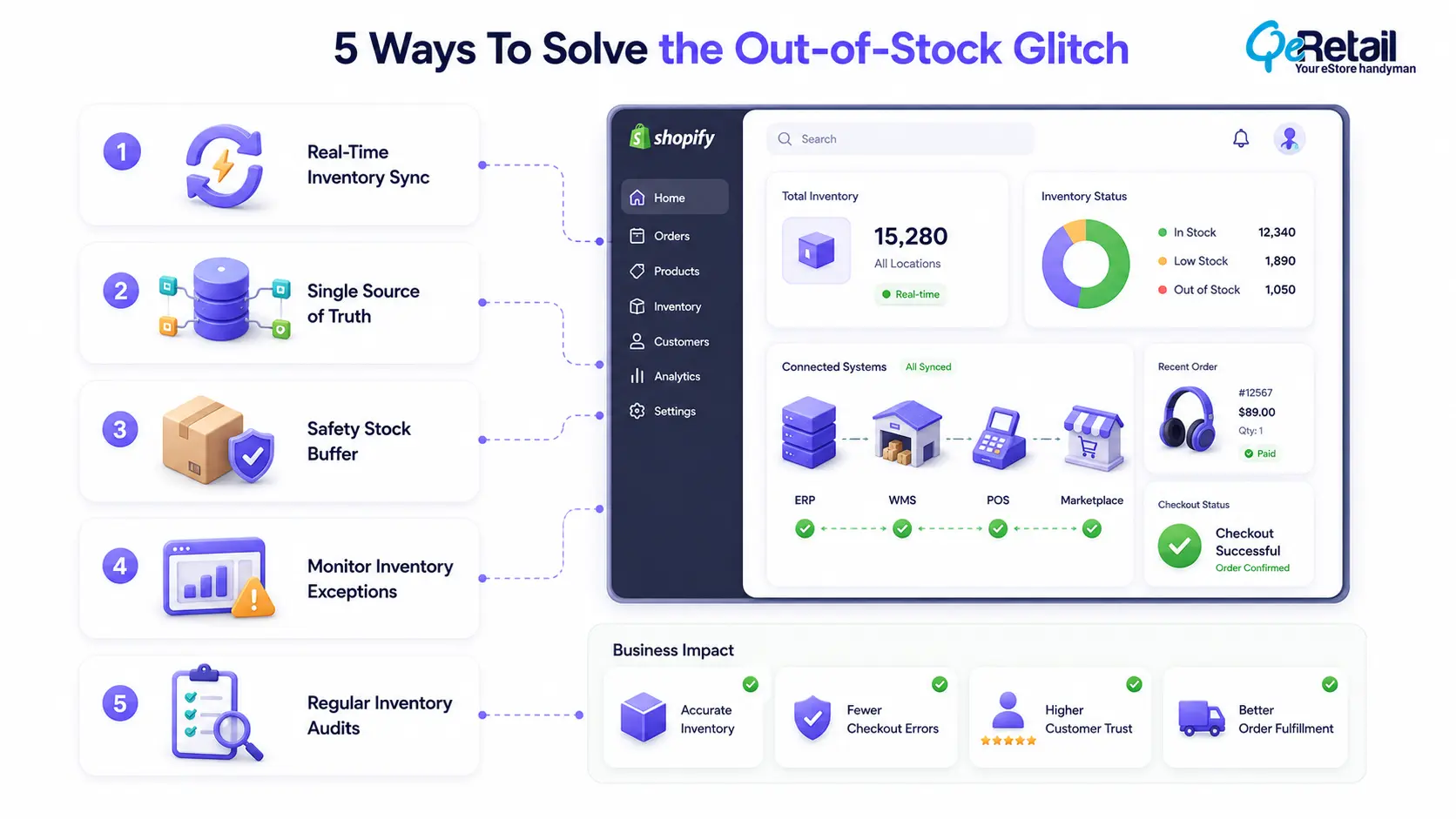
1. Enable Real-Time Inventory Synchronization
Real-time synchronization ensures that every inventory update is immediately reflected across Shopify and connected platforms.
Whether an order is placed online, fulfilled through a warehouse, or sold in a physical store, inventory should update automatically to prevent conflicting stock information.
It becomes especially important during flash sales, seasonal promotions, and high-volume shopping periods.
What Should Shopify Stores Do To Improve?
- Use event-driven inventory synchronization.
- Connect Shopify with ERP and WMS platforms.
- Reduce dependency on scheduled inventory updates.
- Monitor synchronization logs regularly.
Quick Wins:
Review how often inventory is synchronized. If updates occur every 15–30 minutes, consider reducing the interval or implementing real-time updates.
2. Create a Single Source of Inventory Truth
Inventory discrepancies often occur because multiple systems independently manage stock.
Instead of allowing Shopify, marketplaces, warehouses, and ERP systems to maintain separate inventory records, businesses should establish one centralized inventory source.
Every connected platform should reference the same inventory data to maintain consistency.
What Should Shopify Stores Do To Improve?
- Centralize inventory management.
- Integrate all sales channels with one inventory system.
- Standardize inventory update rules.
- Eliminate duplicate inventory records.
Quick Wins:
Map your inventory flow from warehouse to customer. Identifying where stock information is duplicated often reveals the source of synchronization issues.
3. Configure Safety Stock for High-Demand Products
Inventory synchronization, while efficient, is not always instantaneous. Reserving a small quantity of stock helps reduce the risk of overselling during synchronization delays.
Safety stock acts as a buffer, particularly for fast-moving products where inventory changes rapidly.
What Should Shopify Stores Do To Improve?
- Define buffer stock based on sales velocity.
- Apply safety stock to best-selling products.
- Review buffer quantities during peak seasons.
- Monitor inventory trends regularly.
Quick Wins:
Start with a small inventory buffer for your top-selling SKUs and adjust it based on demand patterns.
4. Monitor Inventory Exceptions Proactively
Many merchants discover inventory problems only after customers report them.
A better approach is to monitor inventory exceptions such as negative stock values, failed synchronization events, and unusual inventory adjustments before they affect the customer experience.
What Should Shopify Stores Do To Improve?
- Configure automated inventory alerts.
- Track synchronization failures.
- Review exception reports daily.
- Investigate recurring inventory mismatches.
Quick Wins:
Create a daily report highlighting products with negative inventory or unusually large stock adjustments.
5. Audit Your Inventory Ecosystem Regularly
Inventory processes evolve as businesses add new sales channels, warehouses, and applications.
Regular audits help identify outdated workflows, integration gaps, and process inefficiencies before they become customer-facing issues.
An inventory audit should review not only stock accuracy but also how every connected system exchanges inventory data.
What Should Shopify Stores Do To Improve?
- Schedule quarterly inventory audits.
- Review third-party integrations.
- Test checkout after system updates.
- Validate inventory accuracy across channels.
Quick Wins:
Perform a test purchase after implementing any inventory-related change to confirm stock updates correctly across all connected systems.
How QeRetail Can Help Solve Out-of-Stock Glitch And Improve Checkout Flow?
Preventing out-of-stock checkout glitches requires more than fixing isolated inventory issues. It requires building a connected commerce ecosystem where Shopify, ERP, WMS, POS, and fulfillment systems work together seamlessly.
At QeRetail, we help Shopify merchants optimize their inventory architecture to improve checkout reliability, operational efficiency, and customer satisfaction.
- Shopify Inventory Integration: We integrate Shopify with ERP, warehouse management systems, point-of-sale platforms, and third-party logistics providers to maintain accurate inventory across every sales channel.
- Inventory Workflow Optimization: Our experts evaluate existing inventory workflows, identify synchronization gaps, and recommend improvements that reduce manual intervention and operational risk.
- Checkout Reliability Improvements: We help merchants implement inventory validation and synchronization strategies that minimize overselling and prevent checkout disruptions.
- Ongoing Performance Monitoring: Inventory management is not a one-time implementation. We continuously monitor inventory performance, identify exceptions, and recommend optimizations as your business grows.

Conclusion
Out-of-stock checkout glitches are rarely caused by Shopify alone. They are often the result of disconnected inventory systems, delayed synchronization, and manual processes that struggle to keep pace with business growth.
As your eCommerce operations expand, inventory accuracy becomes essential for protecting customer trust and maximizing revenue.
By adopting real-time inventory synchronization, centralizing inventory management, monitoring exceptions, and regularly auditing your inventory ecosystem, businesses can significantly reduce checkout disruptions and create a more reliable buying experience.
Contact us to build scalable inventory solutions that support long-term growth while delivering a seamless checkout experience.
Frequently Asked Questions
Why Does Shopify Show Products As Available When They Are Actually Out Of Stock?
Can Shopify Prevent Overselling?
How Often Should Inventory Synchronize With Shopify?
How Can I Identify Inventory Synchronization Issues?
Why Is Inventory Auditing Important For Shopify Stores?
Table of Contents