At 12:01 PM EST on Black Friday 2025, Shopify merchants were selling $5.1 million worth of goods every minute. Over the full weekend, that totaled $14.6 billion, up 27% from the year before.
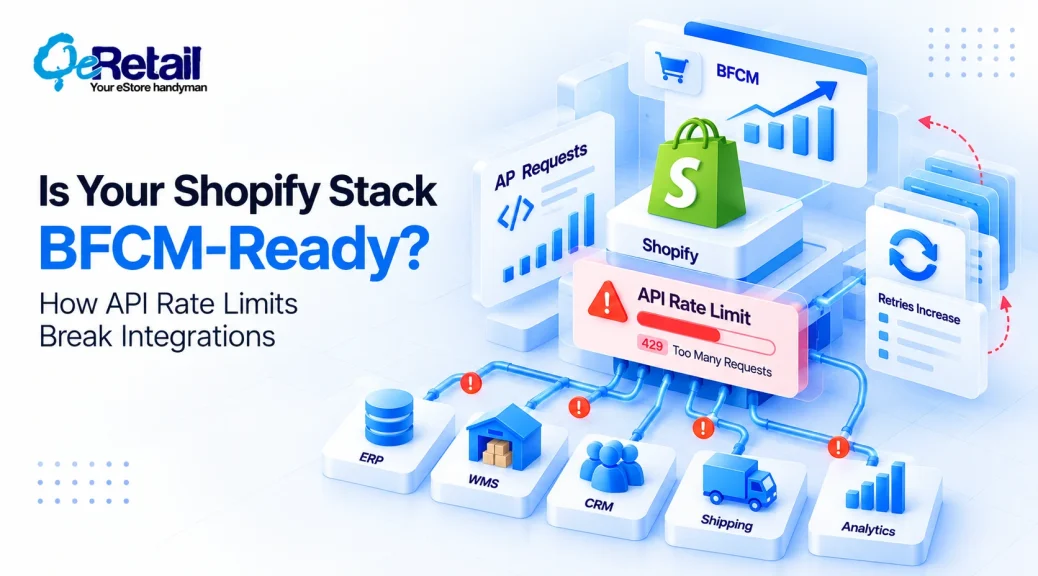
Each order kicks off a chain of work. Inventory has to drop. Your ERP wants the order, your WMS wants a pick list, your shipping app wants a label, your CRM wants the customer, and your analytics tool wants it all now.
So, your integrations call Shopify’s API far more than on a normal Tuesday. Eventually, they hit the ceiling.
Most BFCM prep misses this. Your storefront can stay up all weekend while the systems behind it fall hours behind. Here’s what happens when rate limits kick in, and how to keep critical data moving.
Key Action Points:
- Rank every integration workflow as critical, important, or deferrable before November.
- Test what happens when API demand doubles, then triples.
- Replace instant retries with exponential backoff and hard retry caps.
- Put a queue between Shopify and your downstream systems.
- Track queue depth and sync latency, not just error counts.

Why is BFCM Different From a Normal Sales Day?
A normal day is predictable. Sync jobs finish on time and small queues clear before anyone notices.
BFCM breaks all of that at once.
| Parameters | Normal day | BFCM |
| Request volume | Predictable | Spikes within minutes |
| Orders | Steady | Multiples of baseline |
| Inventory | Changes slowly | Changes by the second |
| Downstream systems | Update on schedule | All want updates at once |
| Background jobs | Run unnoticed | Compete with order processing |
The last row is the one that hurts. A nightly product-enrichment job nobody thinks about in June is now spending the same API budget your order sync needs. (If you don’t know which jobs run during peak hours, you’ll find out on Black Friday.)
What Happens When Your Shopify API Usage Hits the Ceiling?
No app gets unlimited access. Shopify’s GraphQL Admin API charges points per query from a bucket that refills at a fixed rate: 100 points per second on standard plans and 1,000 on Shopify Plus. When the bucket is empty, the REST Admin API throttles requests, which shows up as a 429 error.
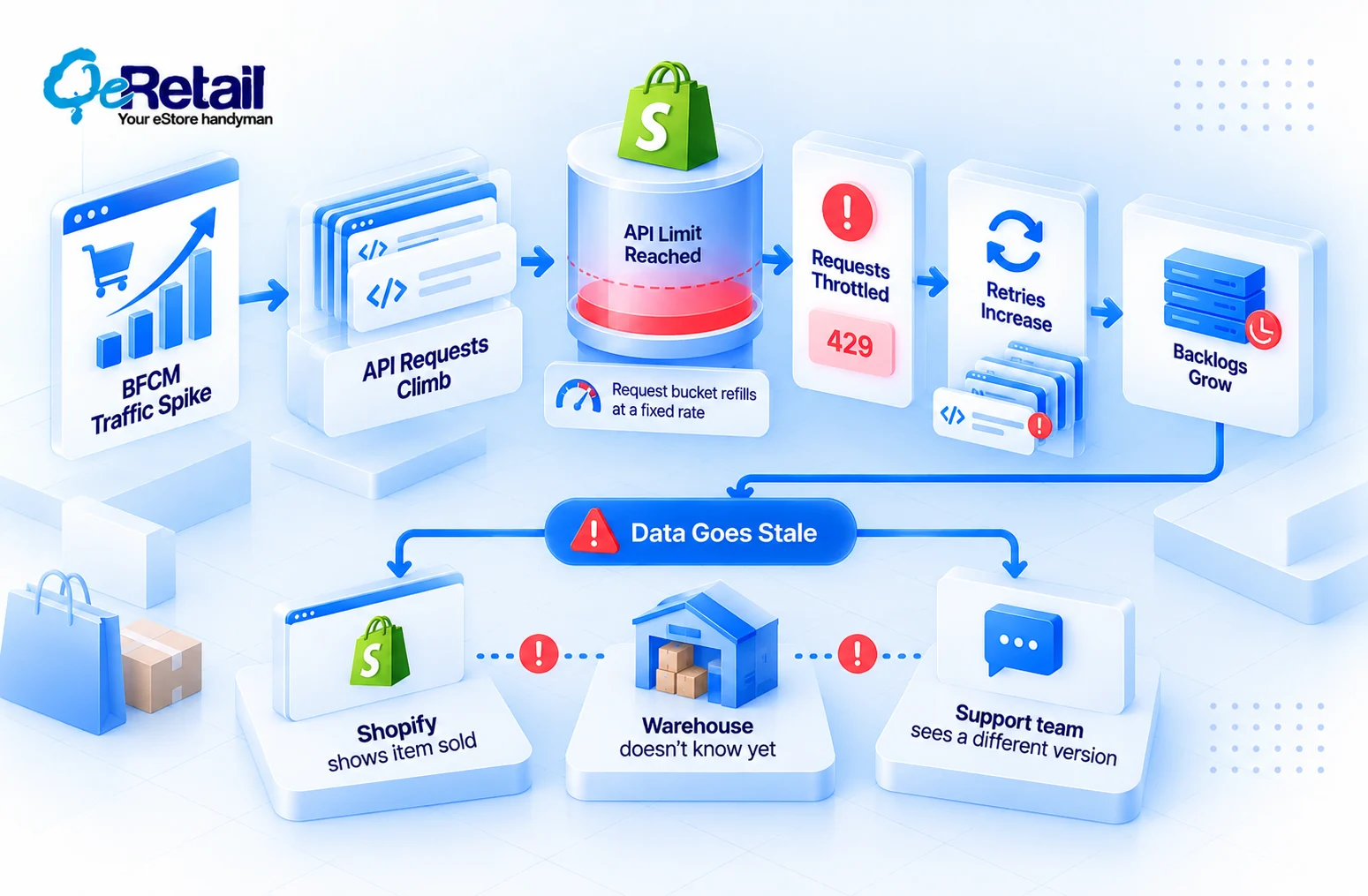
Those limits don’t flex for BFCM. Your traffic does.
BFCM traffic spike → API requests climb → limit approached → requests throttled → retries increase → backlogs grow → data goes stale → operations break
In merchant terms, Shopify says the item sold, your warehouse doesn’t know yet, and your support team is looking at a third version of the truth.
What Do Rate-Limit Problems Look Like During BFCM?
Nobody on your team sees a “429” and panics. They see symptoms. Inventory lags behind actual sales, so you oversell the doorbuster. Orders take 40 minutes instead of 40 seconds to reach your ERP, and fulfillment picks from stale data.
A customer sees “processing” on an order your warehouse already shipped, then emails support to ask why. Your real-time dashboard shows a revenue dip that isn’t real, and someone pauses a winning ad set.
Then your team starts reconciling systems by hand, during your biggest weekend of the year.
Expert Take:
The API error isn’t the business problem. The stale or missing data it creates is. That’s why “zero errors” can mislead you, because a polite integration can log no errors at all while running two hours behind.
Why Can Retries Make the Problem Worse?
A request gets throttled, so the integration retries. That retry spends budget that’s already gone, so it gets throttled too. Now five apps are retrying instantly, and the bucket never gets a chance to refill.
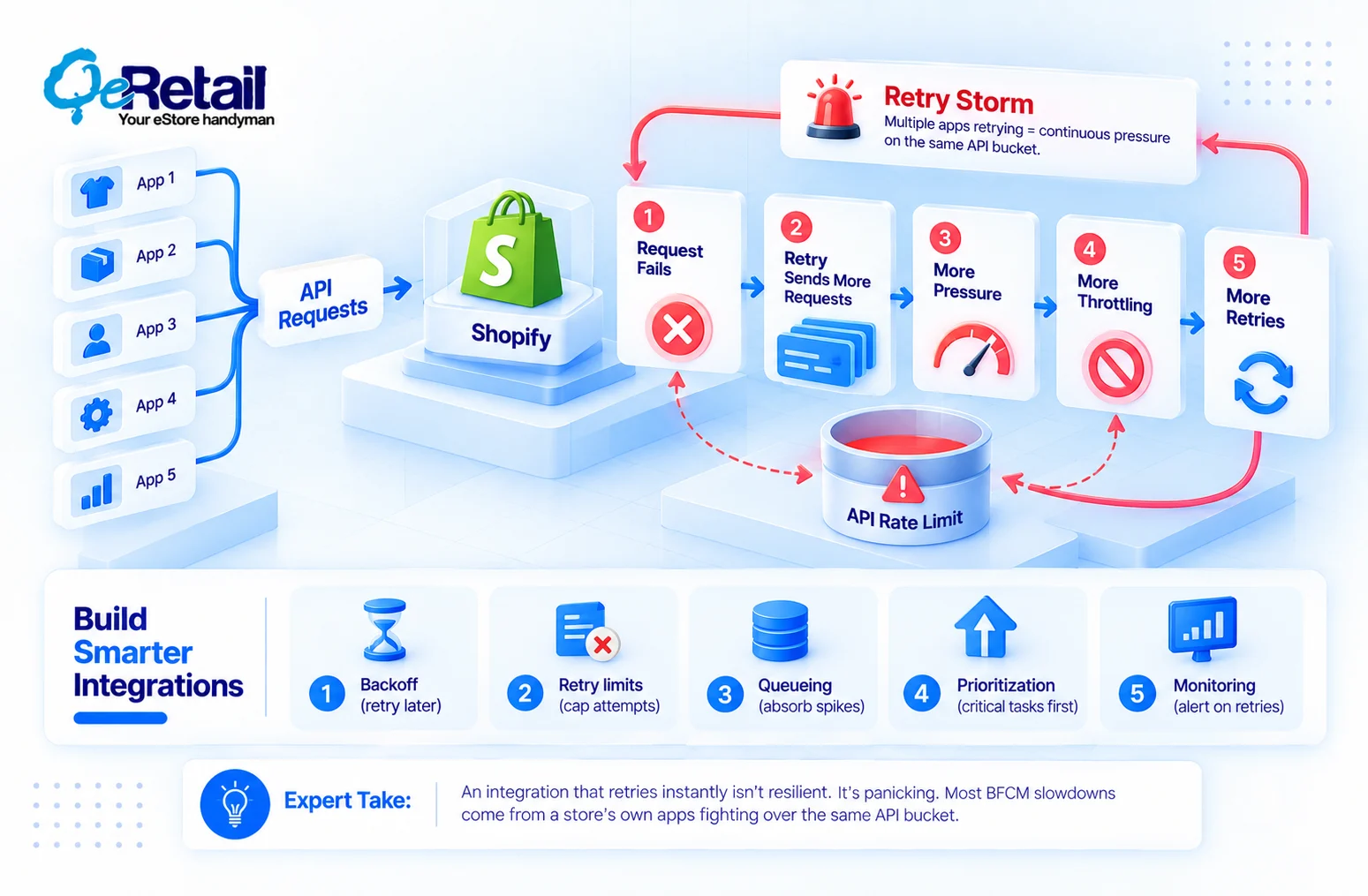
Request fails → retry → more requests → more pressure → more throttling → more retries.
That’s a self-inflicted retry storm. “Watch your API limits” won’t fix it. You need integrations built to behave under pressure,
- Backoff – wait longer after each failure, and honor the Retry-After header Shopify sends.
- Retry limits – cap attempts, then park the job in a dead-letter queue for review.
- Queueing – absorb spikes instead of firing a request the instant each event lands.
- Prioritization – let an order sync jump ahead of a product-tag update.
- Monitoring – alert on retry volume, not only on hard failures.
Expert Take: An integration that retries instantly isn’t resilient. It’s panicking. Most BFCM slowdowns we diagnose come less from Shopify’s limits and more from a store’s own apps fighting over the same bucket.

Which BFCM Workflows Should Get Priority?
When API budget runs short, something has to wait. Decide what now, not at 12:01 PM on Black Friday.
| Priority | Workflows |
| Critical | Order processing, inventory availability, payment and order status, fulfillment |
| Important | Customer notifications, CRM sync, operational reporting |
| Deferrable | Historical data sync, non-critical analytics, low-priority enrichment, background updates |
Critical workflows get first claim on the API. Important ones can lag by minutes. Deferrable ones should pause the moment throttling starts and resume on Tuesday.
How to Prepare Your Shopify Integrations Before BFCM
Before the sale, identify API-heavy integrations and check last year’s peak traffic for request spikes. Test retry behavior against real throttled responses, review queue capacity, and confirm alerts reach a person, not a shared inbox.
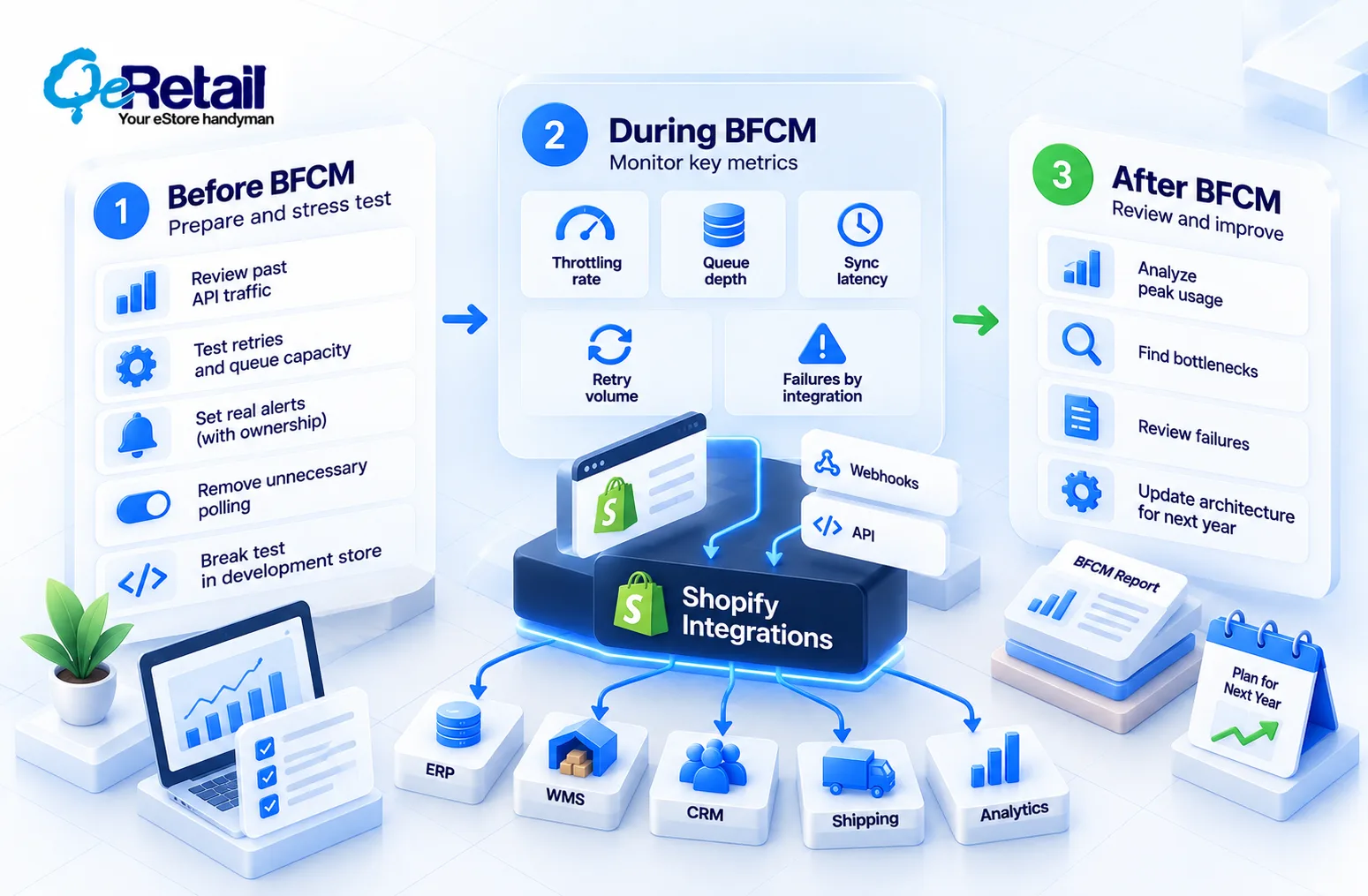
Split critical workflows from non-critical ones. Remove unnecessary polling; an app checking inventory every 10 seconds should listen to webhooks instead. Then break things on purpose in a development store.
During BFCM, watch five numbers: throttling rate, queue depth, sync latency, retry volume, and failures by integration.
After BFCM, review peak usage, find the bottleneck that almost broke, analyze failures, and update your architecture while the data is fresh. So January is when you win next year’s BFCM.
Don’t Wait for BFCM to Find Your Bottleneck
One question tests readiness. Can your integrations absorb a sudden jump in API demand without delaying business-critical data?
Answer these honestly,
- What happens if API requests double? (If you’ve never tested it, you’re guessing.)
- What if they triple?
- Which workflow gets delayed first? (If it’s inventory, you’ll oversell.)
- How long can each workflow tolerate stale data? (Orders, minutes. Analytics, maybe a day.)
- Do retries add load? (Without backoff, yes.)
- Can non-critical jobs pause without a code deploy? (If pausing needs a developer, it won’t happen at 2 AM.)
- Will your team see a backlog before customers do? (If support tickets are your alert, no.)
What Does a BFCM-Ready Integration Architecture Look Like?
Webhooks push events so your systems stop polling. The queue soaks up the spike, and the rate-limit layer spends API budget deliberately, with backoff.
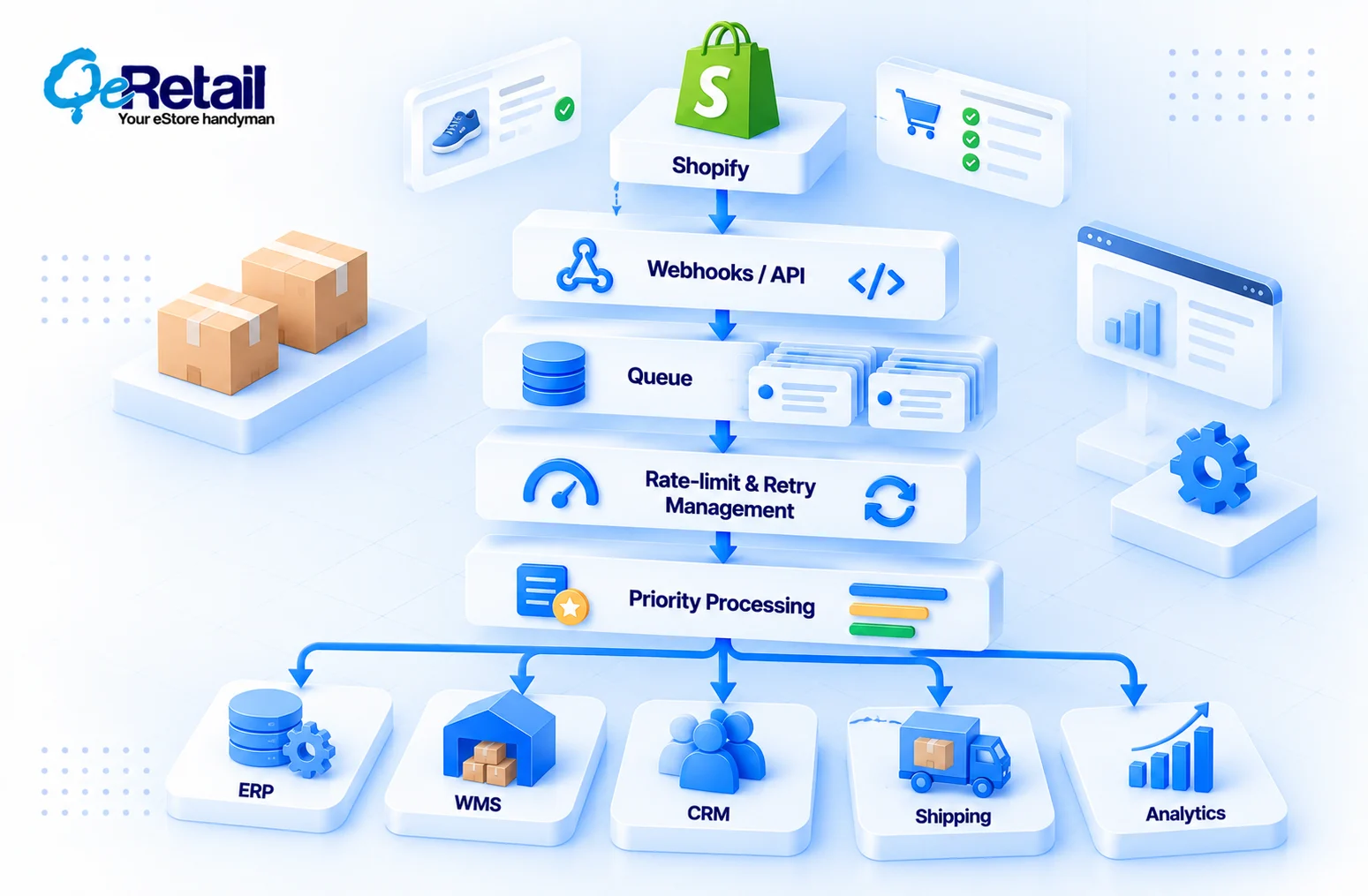
Priority processing moves orders before enrichment. Monitoring and failure handling run across every layer, so a stuck job raises an alert instead of vanishing.
Historical syncs belong in Shopify’s bulk operations, which run asynchronously. So, stop running them as thousands of paginated calls in late November.
BFCM Integration Readiness Checklist
- API consumption is monitored
- Rate-limit responses are handled correctly
- Retries use exponential backoff and hard caps
- Request spikes are absorbed through queues
- Critical workflows have priority
- Non-critical jobs can be deferred without a deploy
- Integration failures generate alerts a person sees
- Sync latency is monitored
- Peak-volume scenarios have been tested
- Your team knows what happens when limits are reached
Stop Load-Testing the Homepage. Start Testing What’s Behind It.
BFCM readiness isn’t only about whether your storefront handles more customers. It’s whether the systems connected to Shopify keep up when your whole business moves faster at once.
If you tuned your theme and optimized your checkout but never stress-tested your integrations, you didn’t prepare for BFCM. You prepared the front door.
Stores that fix this now build a compounding advantage, because every clean peak shows them the next bottleneck. And the load only grows as AI shopping agents add their own API demand.
Not sure how your integrations will behave at three times normal volume?
Book a free Shopify integration assessment, and we’ll map your API-heavy workflows, stress-test your retry behavior, and show you what breaks first, before your customers find it.
Frequently Asked Questions
What Are Shopify's Api Rate Limits?
What Happens When A Shopify App Hits The Rate Limit?
Does Upgrading To Shopify Plus Fix BFCM Rate-Limit Problems?
Are Webhooks Better Than Polling During BFCM?
How Far Ahead Of BFCM Should You Test Your Integrations?
Table of Contents