Your Shopify eCommerce store is getting traffic.
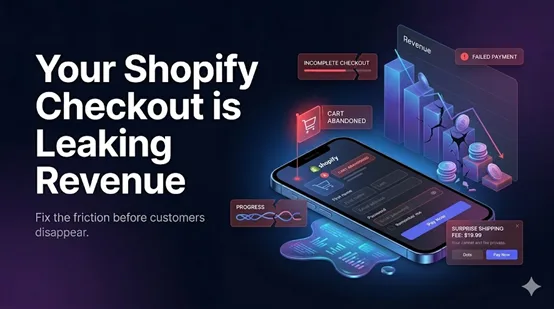
Analytics show sessions, product views, and shoppers adding items to cart. On the surface, everything looks healthy. Then checkout arrives, and the momentum disappears.
According to industry reports, around 70% of online shoppers abandon their carts before completing checkout and making a final purchase.
This is where many Shopify owners lose revenue without realizing it. More than half of online shoppers abandon checkout before completing a purchase.
A minor delay or hidden technical issue can affect conversions, distort analytics, and increase customer acquisition costs over time. This is a practical piece on the reasons for cart abandonment and their fixes.
Key Action Points Summary
Before diving into the full strategies, here is a quick look at the core actions you can take to reduce checkout friction across your DTC store.
- Display estimated shipping and taxes early to prevent final step price shock.
- Remove nonessential fields to reduce decision fatigue.
- Optimize mobile spacing, buttons, and autofill for smaller screens.
- Add local payment methods and digital wallets to match buyer preferences.
- Surface clear return policies right before the final purchase click.
- Place security badges and trust signals near credit card input fields.
- Implement live chat or instant support to resolve last-minute hesitations.

How to Reduce Shopping Cart Abandonment: 5 Practical Strategies That Work in 2026
Cart abandonment rarely comes down to a single checkout bug. In most DTC stores, it happens when small points of friction begin adding up across pricing clarity, mobile usability, payment confidence, and checkout flow.
Here are some practical strategies DTC brands can use to reduce cart abandonment and improve checkout completion rates.
1. Make the Total Cost Visible Early
One of the fastest ways to lose a ready buyer is to reveal shipping fees, taxes, or extra charges only at the final checkout step. When the price changes late in the journey, customers pause, recalculate value, and often leave.
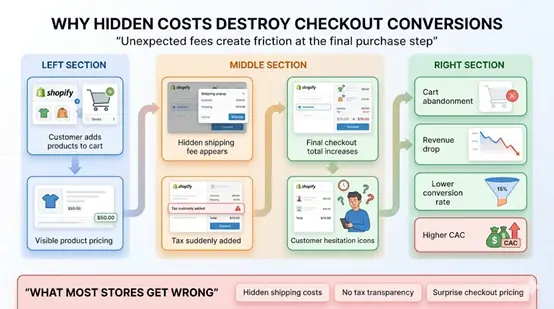
If customers need to discover the final cost at checkout, you are already introducing friction.
What steps can Shopify store owners take?
- Show estimated shipping and taxes directly on product and cart pages.
- Display an order total preview before customers enter checkout.
- Use shipping calculators for location-specific pricing visibility.
- Review whether the cart value drops sharply after shipping is shown.
2. Reduce Checkout Steps and Decision Fatigue
The longer the checkout process feels, the more opportunities shoppers have to rethink the purchase. Every extra field, screen, and decision adds cognitive load. A checkout that feels slow often gets abandoned even when customers intended to buy.
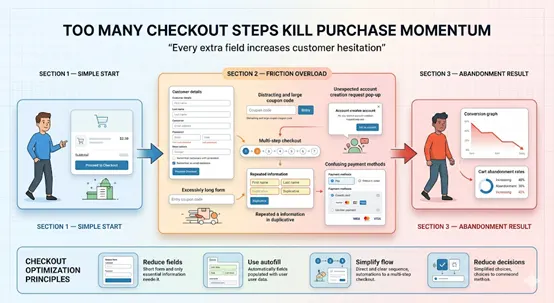
The goal is not fewer clicks alone. The goal is to make every step feel obvious and low effort.
What steps can Shopify store owners take?
- Remove unnecessary fields from checkout.
- Combine related form steps where possible.
- Add a progress indicator so customers know how close they are to completion.
- Review where the biggest drop-off happens inside your checkout funnel.
3. Design Checkout for Mobile First
Most Shopify traffic now comes from mobile devices, but many stores still treat mobile as a scaled-down version of the desktop experience. Small tap targets, long forms, cramped layouts, and weak autofill support often become major conversion blockers.
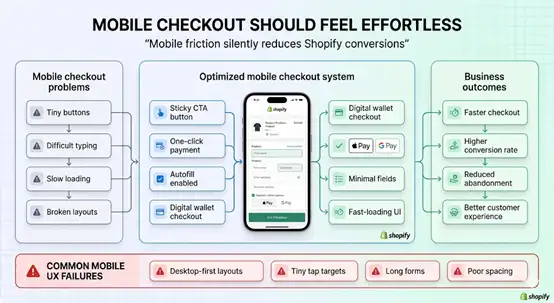
Why is it important? As per the data by Statista, mobile commerce will account for 62% of all eCommerce transactions by 2027.
What steps can Shopify store owners take?
- Use larger buttons and comfortable spacing between fields.
- Enable browser autofill and address autocomplete.
- Keep fonts readable without zooming.
- Use sticky checkout call-to-actions on smaller screens.
- Test checkout on real devices, not only in preview mode.
4. Add Trust Signals Where Customers Hesitate
Trust matters most at checkout. Even small uncertainty around security, legitimacy, or reliability can stop a purchase. Shoppers often decide in seconds whether a store feels safe enough to share payment details.
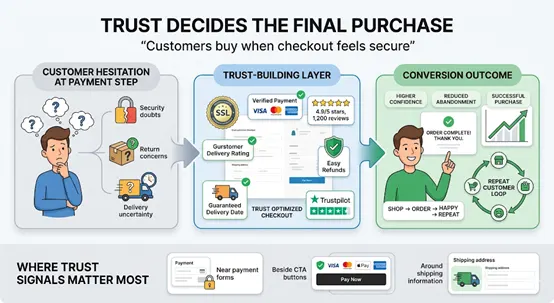
Trust signals work best when they appear exactly where hesitation usually appears.
What steps can Shopify store owners take?
- Show secure payment indicators and SSL reassurance near payment fields.
- Add customer ratings or brief testimonial snippets near checkout actions.
- Surface delivery expectations clearly.
- Make support access visible without forcing users to leave checkout.
5. Use Checkout Support That Solves Questions Instantly
Many abandoned carts come from unanswered last-minute questions. Customers hesitate because they are unsure about delivery timing, returns, payment errors, or the behavior of discount codes. If there is no quick answer, they leave.
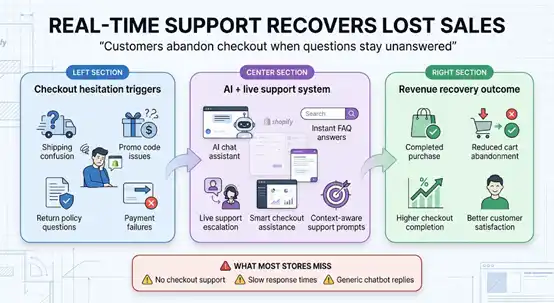
Support should remove friction, not interrupt the checkout process.
What steps can Shopify store owners take?
- Use checkout-specific chat support or AI assistance for common purchase questions.
- Trigger support only when hesitation signals appear, such as idle time or repeated errors.
- Train support flows around shipping, returns, payments, and promo codes.
- Keep escalation paths available for human assistance.

What If You Cannot Fix Cart Abandonment On Your Own?
Not every Shopify store has an internal technical team. And even when you do, cart abandonment is not always easy to diagnose or fix. Many checkout issues sit deeper than basic design changes.
They often involve theme behavior, app conflicts, payment flow logic, shipping rules, mobile responsiveness, or hidden performance bottlenecks that are difficult to identify through analytics alone.
How QeRetail helps Shopify stores reduce cart abandonment:
- Identify hidden checkout friction affecting conversion performance.
- Diagnose theme, app, payment, and shipping-related issues.
- Improve mobile checkout usability and responsiveness.
- Resolve speed, rendering, and performance bottlenecks.
- Audit checkout flows from the customer-journey and conversion perspectives.
- Provide fast execution without long onboarding cycles.
- Support targeted fixes without requiring permanent hiring.
Conclusion
Cart abandonment is not only a conversion metric. It is often an early signal of deeper operational inefficiencies inside your Shopify eCommerce store.
When abandoned checkouts increase, they usually reveal gaps in store scalability, customer confidence, and the reliability of the purchase journey.
QeRetail approaches Shopify optimization with both technical precision and commercial understanding.
As a digital solutions company, we help brands identify hidden friction, strengthen checkout stability, and improve customer journey performance through practical, data-backed execution.
If you want to uncover what is silently affecting your Shopify conversions, contact us.
Frequently Asked Questions
Why Is My Shopify Store Getting Traffic but Not Enough Sales?
Traffic does not always translate into revenue. Many Shopify stores lose buyers in the final purchase stage when small checkout friction points interrupt intent. Reviewing cart-to-checkout progression often reveals where conversion momentum is breaking.
What Is Considered a High Cart Abandonment Rate for a Shopify Store?
For most eCommerce stores, a cart abandonment rate above 70% is generally considered high. The more useful approach is to compare abandonment by device type, traffic source, and checkout step so you can identify where the real leakage is happening.
Does Shopify Checkout Speed Affect Conversion Rates?
Yes. Checkout speed has a direct impact on purchase completion. Even a small delay in page rendering, payment loading, or form response can increase exits, especially for mobile shoppers who expect fast and seamless checkout experiences.
How Can I Find Where Shoppers Drop Off During Checkout?
Use checkout funnel analysis to track movement from add-to-cart to checkout start, shipping details, payment submission, and completed purchase. Looking at step-level drop-off gives far more actionable insight than reviewing only overall conversion numbers.
When Should I Get Expert Help to Reduce Shopify Cart Abandonment?
If you have already made basic checkout improvements but abandonment remains high, it usually points to deeper technical or operational issues. That is the right stage to bring in Shopify specialists who can diagnose hidden friction and conversion bottlenecks.
Table of Contents