A Shopify redesign usually starts with a visual goal.
The store may need a cleaner interface, stronger product presentation, better navigation, improved mobile experience, or a more modern brand identity.
But a redesign can also change how customers interact with the storefront.
Navigation patterns can change. Buttons can become harder to identify. Color combinations can lose sufficient contrast. Form fields may become difficult to understand with assistive technology. Keyboard users can encounter new obstacles that were not present in the previous theme.
These issues are easy to miss when a redesign is evaluated primarily through screenshots, visual reviews, and standard functional testing.
Accessibility QA provides another layer of validation by examining whether people with different abilities can actually navigate, understand, and interact with the redesigned storefront.

Key Action Points Summary
- Include accessibility testing before the redesigned storefront goes live
- Test critical customer journeys rather than checking individual components in isolation
- Review keyboard navigation across menus, forms, filters, and checkout-related interactions
- Check color contrast for text, controls, links, and important interface states
- Validate headings, labels, buttons, and landmarks for meaningful structure
- Test dynamic elements such as drawers, modals, accordions, and predictive search
- Check image alternative text based on the purpose of each image
- Review focus states and ensure keyboard users can see where they are
7 Accessibility QA Checks Shopify Stores Should Complete Before A Redesign Goes Live
Accessibility should not be treated as a single technical check performed after development.
The following checks focus on the areas most likely to affect real customer journeys during a storefront redesign.
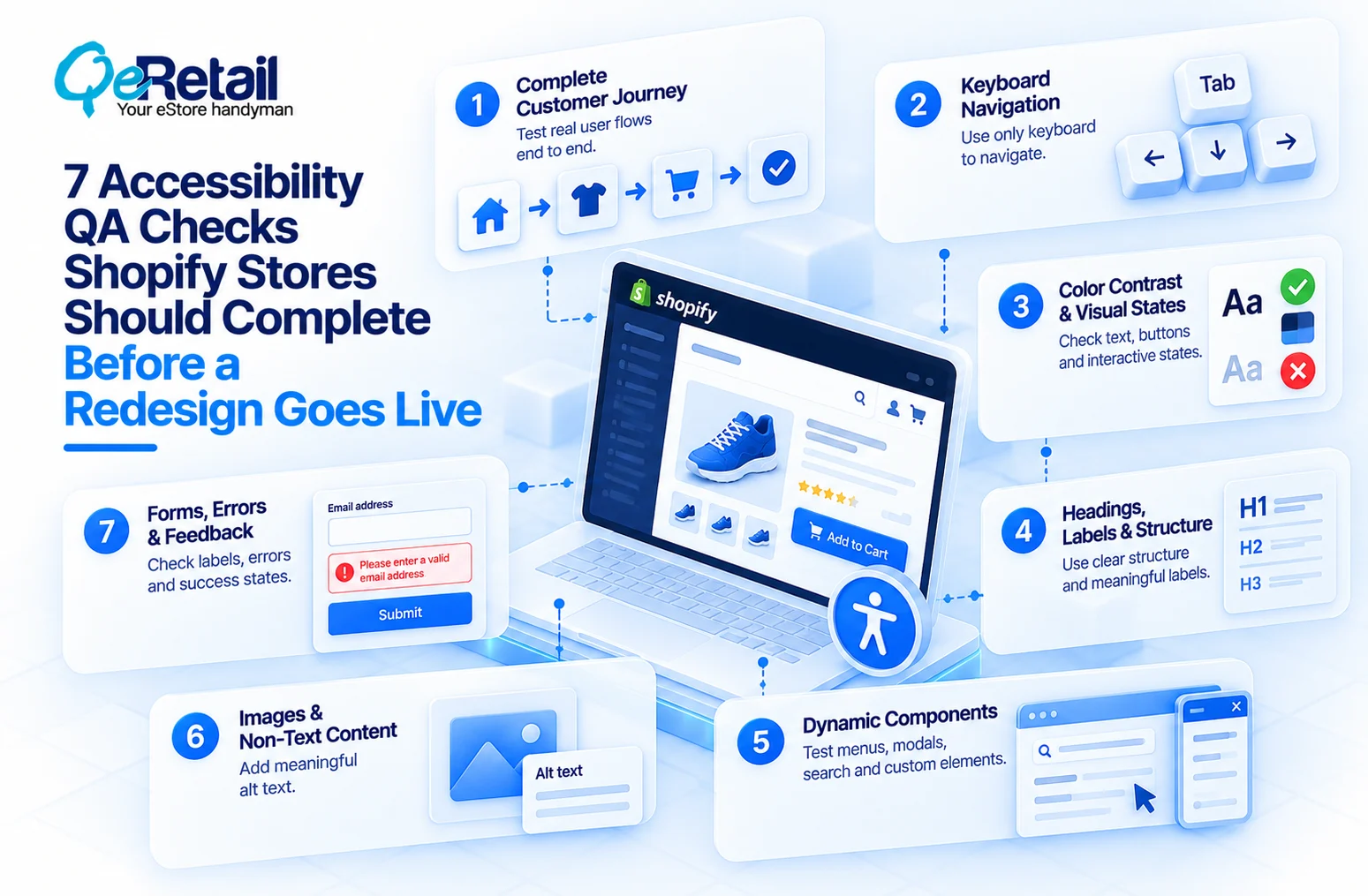
1. Test The Complete Customer Journey, Not Just Individual Components
A button may work correctly when tested by itself while the complete journey around it remains difficult to use.
A customer may need to move from navigation to collection filters, product selection, variant selection, cart actions, account forms, and other interactions before completing a purchase.
Accessibility QA should therefore follow the same paths customers follow.
What Should Shopify Stores Do To Improve?
- Map the most important customer journeys before testing
- Include homepage-to-product and collection-to-product paths
- Test product selection and variant interactions
- Include search, filtering, cart, and account-related journeys
- Record accessibility issues at the point where they interrupt the journey
Quick Win:
Choose your three highest-value customer journeys and complete each using only keyboard navigation before reviewing individual storefront components.
2. Check Whether The Store Can Be Navigated Without A Mouse
Keyboard accessibility is one of the simplest ways to identify whether a redesigned interface remains usable beyond mouse interaction.
Customers should be able to move through interactive elements in a logical order, identify where focus is located, open required controls, and complete important actions without depending on a pointer.
Redesigns can unintentionally introduce problems when custom navigation, sliders, menus, filters, or modal interfaces change the natural interaction order.
What Should Shopify Stores Do To Improve?
- Move through the storefront using only the keyboard
- Check whether interactive elements receive visible focus
- Confirm that focus follows a logical sequence
- Test menus, filters, search, modals, and accordions
- Make sure important actions can be completed without a mouse
Quick Win:
Turn off your mouse and complete one product-to-cart journey using only Tab, Shift+Tab, Enter, and the available keyboard controls.
3. Review Color Contrast And Visual States
A visually attractive redesign can still create accessibility problems when text, icons, borders, or controls do not have enough contrast.
This is particularly easy to introduce when a redesign uses subtle typography, lighter secondary text, minimal borders, muted buttons, or brand colors with similar tones.
Accessibility QA should examine more than the default appearance. Hover, focus, disabled, selected, error, and active states also need to remain distinguishable.
What Should Shopify Stores Do To Improve?
- Check text against its background
- Review important interface icons and controls
- Test links in their normal and active states
- Check focus, error, selected, and disabled states
- Avoid relying on color alone to communicate important information
Quick Win:
Review your redesigned storefront with a contrast checker and pay particular attention to secondary text, form errors, links, and inactive controls.
4. Validate Headings, Labels, And Page Structure
Accessibility is not only about how a page looks.
A storefront can have a visually clear hierarchy while its underlying structure communicates something completely different to assistive technology.
Heading levels, form labels, landmarks, buttons, links, and other semantic elements help users understand what each part of the page represents and how different sections relate to one another.
Theme customization can unintentionally weaken this structure when visual styling takes priority over semantic HTML.
What Should Shopify Stores Do To Improve?
- Review the heading hierarchy on important templates
- Use headings according to their structural purpose
- Give form controls meaningful labels
- Distinguish links from buttons based on their function
- Check whether major page regions have meaningful structure
Quick Win:
Inspect one redesigned product page without looking at its visual styling and review whether its headings, labels, buttons, and links still communicate the intended structure.
5. Test Dynamic Shopify Components And Custom Interactions
A mobile navigation drawer may open without moving focus correctly. A product quick-view modal may trap or lose keyboard focus. A predictive search component may update results without communicating the change clearly.
These interactions deserve special attention during a redesign because they often involve custom JavaScript, theme modifications, or third-party components.
What Should Shopify Stores Do To Improve?
- Test mobile navigation drawers
- Review search suggestions and dynamic results
- Test product quick views and modals
- Check accordions, tabs, sliders, and expandable sections
- Confirm that focus and interaction states remain understandable after content changes
Quick Win:
List every interactive component added or modified during the redesign and test each one with keyboard navigation before launch.
6. Review Images, Product Media, And Non-Text Content
Product images are central to most Shopify storefronts, but not every image should be handled in the same way.
A product image may communicate essential information. A decorative background may add visual atmosphere without contributing information. A promotional graphic may contain important messaging that should not exist only inside the image itself.
Accessibility QA should therefore evaluate the purpose of each important image instead of applying the same alternative-text approach everywhere.
What Should Shopify Stores Do To Improve?
- Identify images that communicate meaningful information
- Provide appropriate alternative text where necessary
- Avoid unnecessary descriptions for decorative imagery
- Review promotional graphics containing important text
- Check product galleries and image controls for accessible interaction
Quick Win:
Select ten important product and promotional images and classify each as informative, functional, or decorative before reviewing its alternative text.
7. Test Forms, Errors, And Customer Feedback States
Forms can become difficult to use when customers cannot understand what information is required or why an entry has been rejected.
A redesigned Shopify storefront may include newsletter forms, contact forms, account interfaces, search fields, discount inputs, and other customer-facing controls.
Accessibility QA should test not only successful submissions but also what happens when customers enter incomplete or incorrect information.
What Should Shopify Stores Do To Improve?
- Check whether every form field has a meaningful label
- Make required information clear
- Test validation messages and error states
- Ensure errors are understandable without relying only on color
- Check whether customers can identify and correct the problem
Quick Win:
Submit each important storefront form with missing or invalid information and check whether the resulting error clearly explains what needs to be corrected.
How QeRetail Helps With Shopify Accessibility QA
Accessibility testing becomes more valuable when it is integrated into the redesign rather than performed as a final compliance exercise.
Forrester’s 2025 accessibility research emphasizes combining automated and manual testing and moving accessibility checks earlier into design and development, rather than relying solely on testing after a digital experience has been built.
#1. Accessibility-Focused Storefront Audits
Our team reviews key Shopify storefront experiences to identify accessibility issues across navigation, content, forms, interactive components, and customer journeys.
#2. Keyboard And Interaction Testing
We test important storefront interactions without relying on mouse input, helping identify focus, navigation, interaction order, and control-accessibility problems.
#3. Shopify Theme Accessibility Review
Our experts examine customized Shopify themes and storefront components to identify implementation choices that may interfere with accessible navigation, semantic structure, or assistive-technology use.
#4. Responsive Accessibility Testing
Accessibility can change between desktop and mobile experiences. We review responsive layouts, navigation patterns, menus, controls, and touch-oriented interactions across relevant screen sizes.
#5. Assistive Technology Testing
Where appropriate, our team evaluates important customer journeys using assistive technologies to identify issues that automated scanning alone may not reveal.
#6. Accessibility Improvements And Remediation
After identifying issues, we can work through the required theme, component, markup, and interaction changes so accessibility improvements become part of the storefront implementation.

Conclusion
A Shopify redesign changes more than the appearance of a storefront.
It can change navigation, interaction patterns, content structure, forms, product discovery, and the way customers complete important tasks.
For growing Shopify stores, accessibility QA can provide another level of confidence that a redesigned storefront is usable across different customer needs and interaction methods.
QeRetail helps Shopify businesses evaluate and improve storefront accessibility as part of broader redesign, theme customization, and customer-experience initiatives.
Contact us to review your Shopify storefront before a redesign turns accessibility issues into customer experience problems.
Frequently Asked Questions
What Is Shopify Accessibility QA?
Can Automated Accessibility Tools Find All Shopify Accessibility Problems?
Should Accessibility Be Tested Before Or After A Shopify Redesign?
What Shopify Store Elements Should Be Included In Accessibility Testing?
Does Shopify Accessibility QA Only Benefit Customers With Disabilities?
Table of Contents