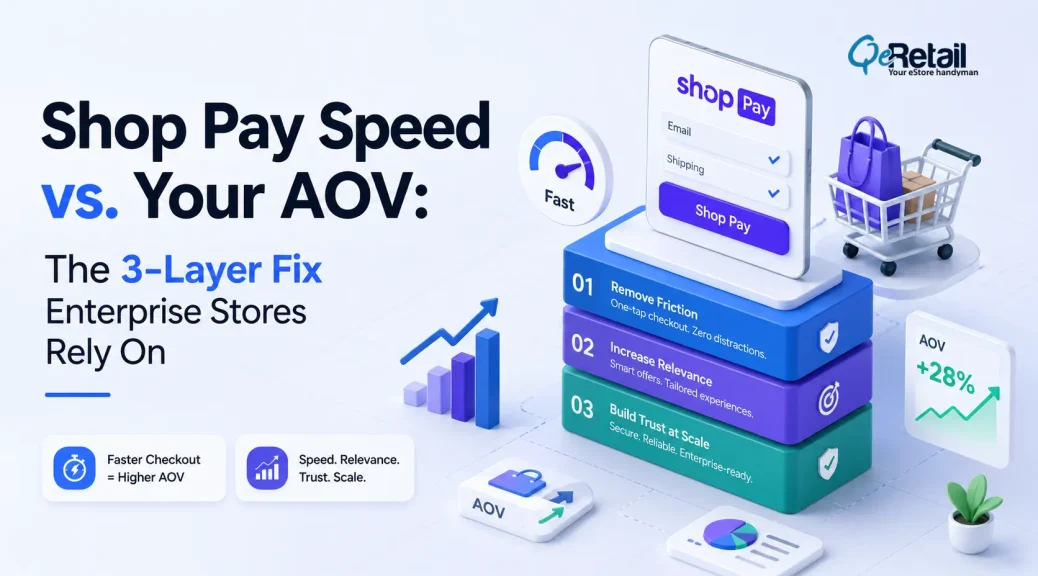
You place Shop Pay One-Tap for ease of payments.
But it’s killing your revenue.
And any chance you have to upsell, cross-sell, and recommend products to customers.
HOW?
These one-tap payment options take customers directly to the thank-you page. This means your post-purchase opportunities of cross-selling or increasing average order value are gone.
But it’s not just about the post-purchase; it also skips the pre-purchase recommendations, reducing the chances of high-intent customers adding more value to the cart.
And why is this important for a Shopify store owner?
Because Shopify’s own report shows that a well-timed post-purchase offer can increase the average order value by 5.6%.
And if you are a Shopify store owner with a revenue between $100k and $500k, a 5.6% increase in AOV can make a big difference.
This piece focuses on a roadmap to create a 3-layer system for your upselling activities, leveraging the Shop-Pay One-Tap feature. But first, let’s understand the problem at hand.
Keypoints:
- Keep it actionable, so readers should follow this
- Move upsells into cart drawer, not PDP
- Keep the express checkout button at the bottom
- Build a post-checkout offer using Shopify Functions only
- Limit post-checkout offer to one SKU
- Price that SKU under 20% of the cart
- Turn on the thank-you page “Edit Order” widget
- Send one post-purchase confirmation email always
- Set a 60-minute window before fulfillment locks
- Match the countdown timer on the widget and email
- Launch cart drawer first, alone, week one
- Watch the checkout completion rate for seven days
- Add a post-checkout offer only in week two
- Track offer accept rate separately from AOV
- Launch widget and email together in week three
- Audit upsell app runs on Functions, not scripts

Why Are Your Upsells Disappearing?
The problem starts with the data that’s not visible. You open the Shopify dashboard, log in, and see that the traffic is steady, but conversion rates are holding. But what’s declining is your average order value.
You blame the strategy while the real culprit here is your accelerated checkout button. Express payment options like Shop Pay, Apple Pay, and Google Pay reduce the friction between the product page and the checkout page. They reduce the time needed to close sales.
But placing these dynamic “Buy Now” pages directly on the product pages allows shoppers to bypass conventional shopping carts.
What this means is all your product recommendations, bundled offers, and upselling strategies go for a toss.
Why does Shop Pay One-Tap Skip Your Offers?
Shop Pay One-Tap skips your upsell offers at two stages,
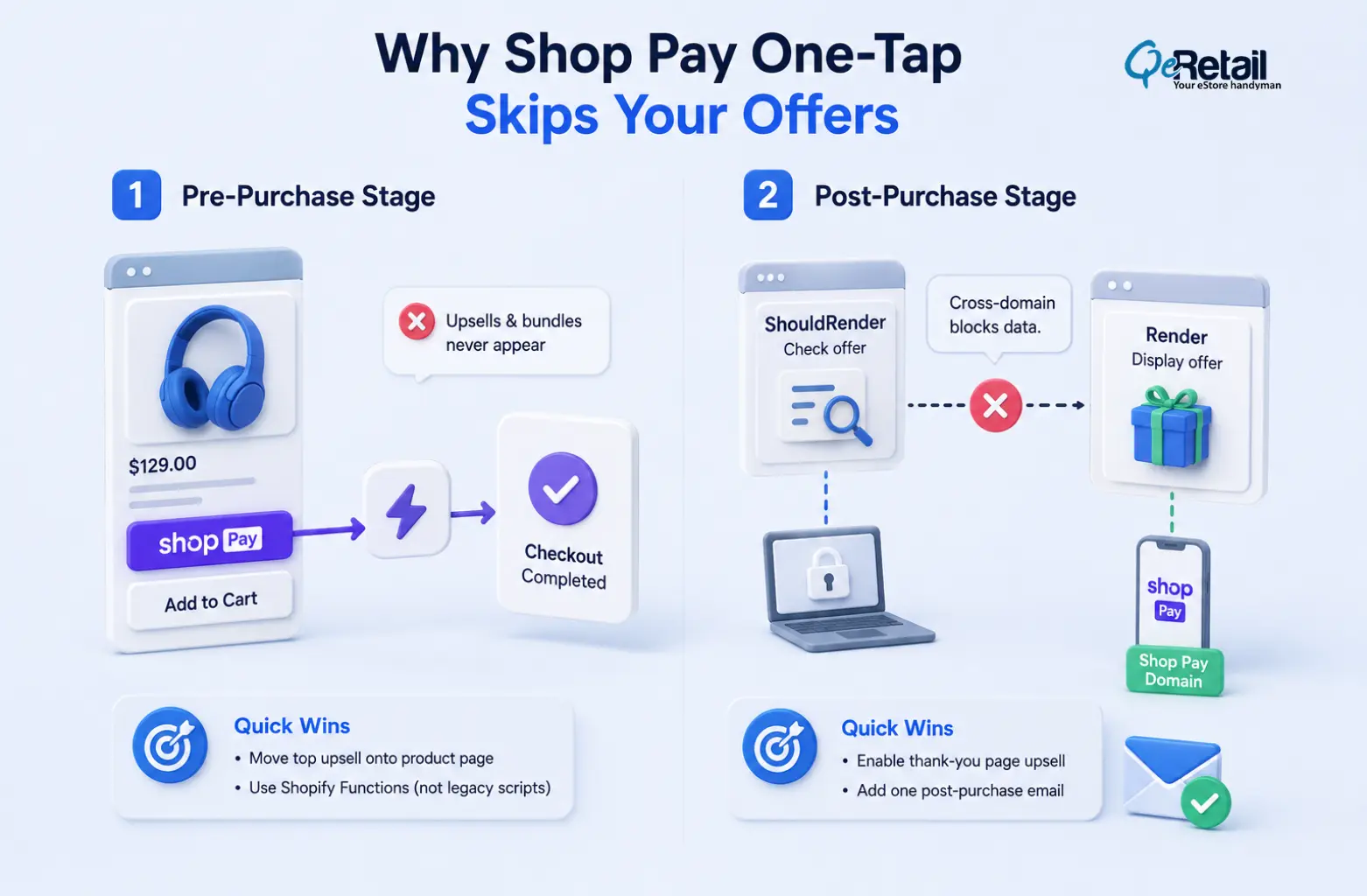
1. Pre-Purchase Stage
Accelerated checkout buttons like Shop Pay are often placed directly on the product detail page or PDP. What this does is provide a direct checkout option for the customers.
It’s designed to collapse the conventional form of the customer journey that routes through multiple screens and reaches the checkout page. Instead, it offers a clear path for customers to complete the transaction in one single shot.
Quick Wins:
- Move your top upsell onto the product page
- Confirm your upsell app runs on Shopify Functions, not legacy checkout scripts.
2. Post-Purchase Technical Divide
If your Shopify store relies on post-purchase upsells, then Shop Pay bypasses it too. It introduces a critical technical hurdle. There are two extension targets to showcase your offers,
- ShouldRender- This extension checks if an offer is available
- Render- This extension displays the offer if available
Now, if there is a credit card transaction, the checkout process easily passes data between these two target extensions using the browser’s local storage API.
However, the most significant impact is due to the difference in web domains. ShouldRender runs on the merchant domain. At the same time, web browsers block cross-domain local storage access to protect data.
Now, if your upsell page can’t read the stored data, displaying the offer specifically based on that information becomes difficult.
Quick Wins:
- Turn on the thank-you page upsell block
- Add one post-purchase email to your flow
A 3-Layer Upsell System to Improve Your AOV
Accelerated checkouts offer better conversion rates, and you can’t switch them off. But at the same time, it’s important that your upsell pages are also displayed and don’t get bypassed. How about a “Win-Win.”
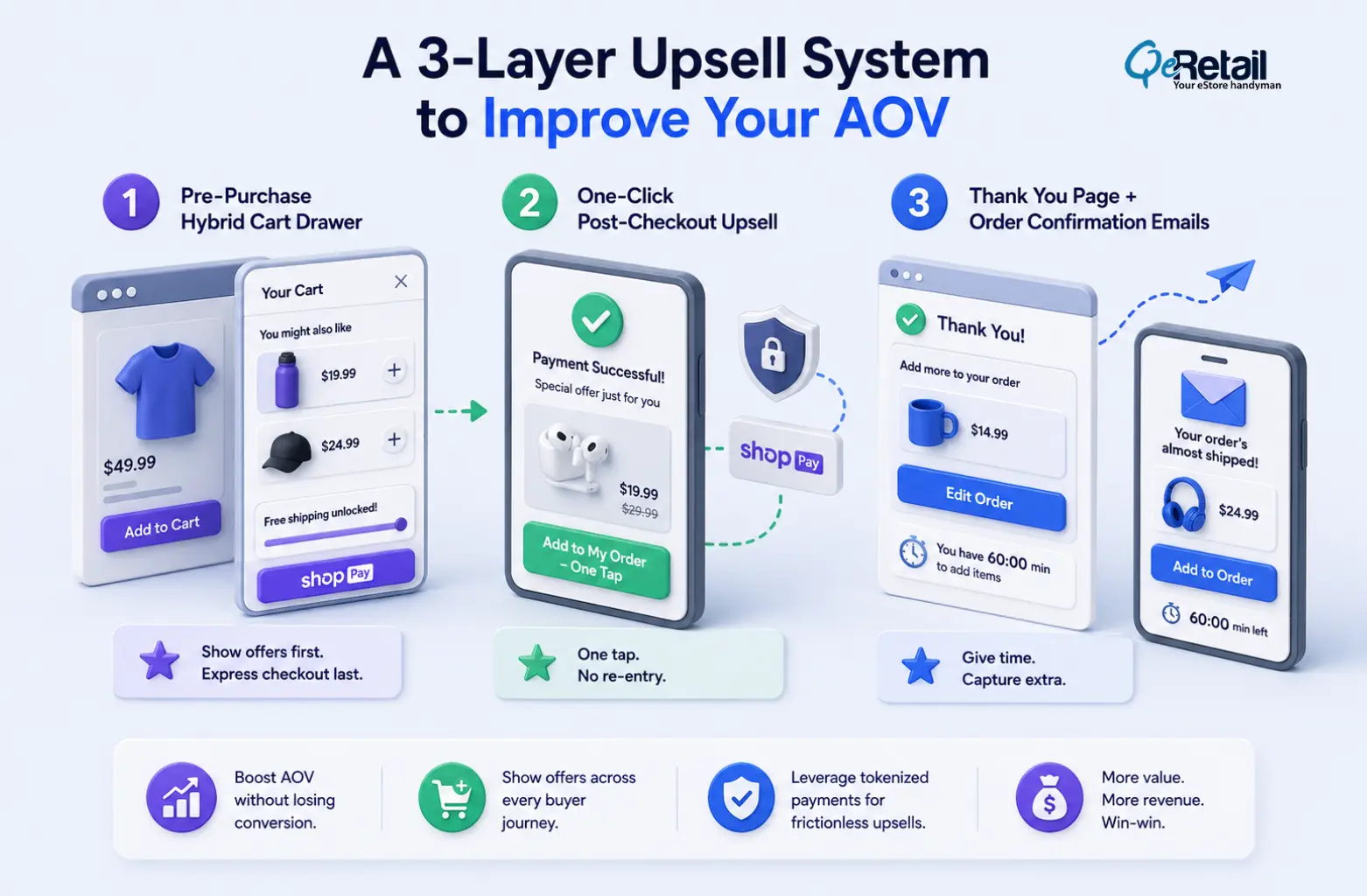
This 3-layer upselling system ensures your conversion rates and AOV both surge.
1. Pre-Purchase Hybrid Cart Drawer
Instead of putting a dynamic button directly on the product page, change the “Add to Cart” so that it opens as a slide-out cart drawer. In the drawer, show your upsells, progress bars for free shopping, and bundled products.
Expert Take:
Keep the express checkout button at the absolute bottom of this drawer. It guarantees that each shopper needs to go through your offers before checking out.
2. One-Click Post-Checkout Upsell
Show special offer right after payment clears, before the Thank You page loads. Card or Shop Pay already tokenized and authorized, so shopper accepts new offer one tap, zero re-entry of shipping or payment data.
Expert Take:
Cap this offer to a single SKU, price it under 20% of cart value. Higher friction-to-reward ratio here kills conversion fast.
3. Thank You Page + Order Confirmation Emails
Wallet checkouts (Apple Pay, Google Pay, Klarna) skip Layer 2 entirely. Catch them with an “Edit Order” widget on the Thank You page, open a window (60 min) to add items before fulfillment locks. Browser already closed? Transactional email (“Your Order’s Almost Shipped”) carries a one-click “Add to Order” button; the same window applies.
Expert Take:
Set the countdown timer visible on both the widget and email. Urgency plus already-authorized payment method = near-zero friction add-on rate.
Rolling Out the 3 Layers Without Breaking Checkout
Don’t flip all three layers live in one deploy. Sequence it, and you’ll catch what breaks before it costs you a checkout.
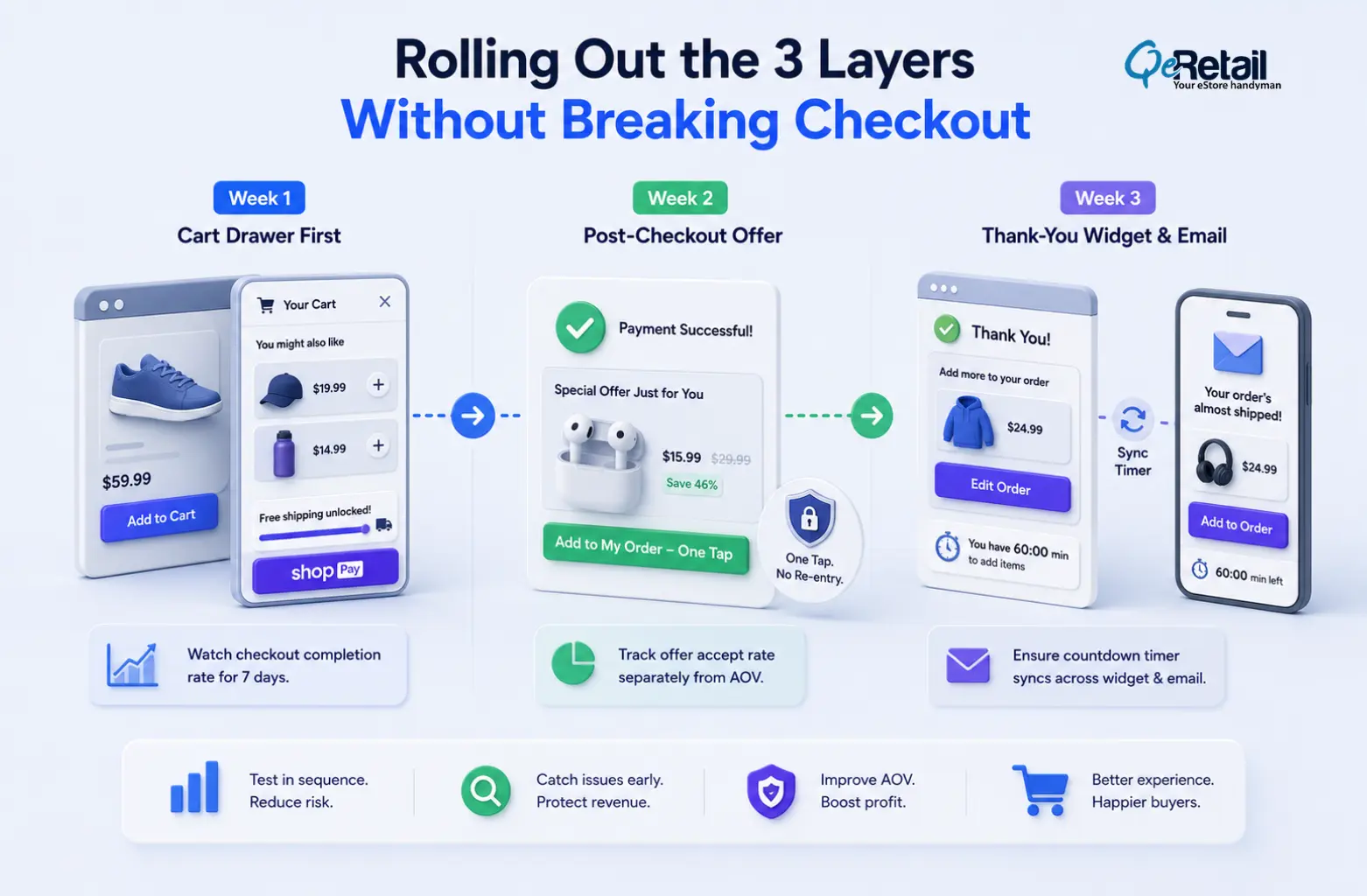
Week 1: Cart drawer first. Swap the PDP buy button for the drawer. Watch the checkout completion rate for seven days. A drop here means friction, not upsell fatigue. Fix the drawer before adding Layer 2.
Week 2: Post-checkout offer. Turn on the ShouldRender/Render extension pair, single SKU only. Track accept rate on the offer separately from overall AOV; mixing the two metrics hides whether the offer itself is working.
Week 3: Thank-you widget and email. Launch both together since they share the same 60-minute window and the same “Add to Order” logic. Confirm the countdown timer syncs across widget and email; a mismatched clock kills trust in the offer.

Stop Losing AOV to Convenience. Start Layering Offers Around It.
Shop Pay One-Tap isn’t going away, and turning it off to protect your upsells costs you more in abandoned carts than the upsell revenue you’re chasing. The fix was never disabling the checkout speed customers want.
The fix is building three separate catch points: one before the tap, one the instant after it, and one after the browser closes so no purchase path skips every single offer at once.
Stores running just one of these layers leave the other two touchpoints empty. Stores running all three see the 5.6% AOV lift compound across pre-purchase, post-purchase, and post-browser-close moments, instead of betting it all on a single upsell block that Shop Pay routes around.
Book a free consultation, and we’ll audit where your current checkout flow is silently dropping upsell opportunities.
Frequently Asked Questions
Does Shop Pay One-Tap Skip Post-Purchase Upsells For Every Payment Method?
How Much Of A Revenue Difference Does A 5.6% Aov Lift Actually Make At $100k–$500k In Annual Revenue?
Will Adding A Cart Drawer Slow Down My Shopify Conversion Rate?
Do I Need A Developer To Set Up The Shouldrender And Render Extensions?
How Long Should The “Edit Order” Window Stay Open On The Thank You Page?
Table of Contents