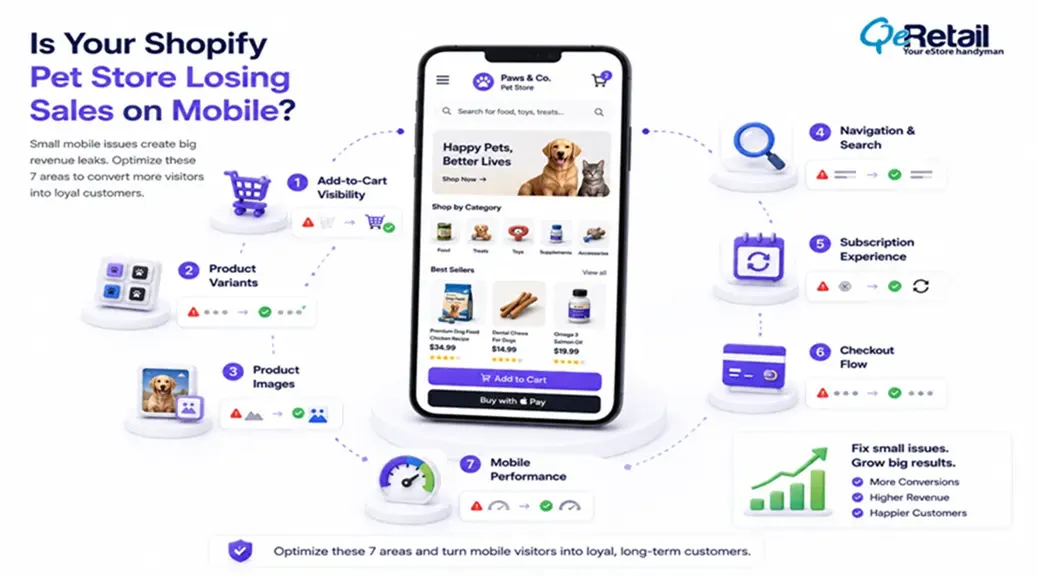
Mobile traffic is no longer a secondary sales channel for Shopify pet brands.
The majority of the product discovery now happens on mobile devices, no matter if it is a Shopify pet store or any other store. Users are now browsing products on a pet store from their mobile phones while managing daily routines and work.
Yet many Shopify pet stores are still optimized primarily around desktop experiences.
The result is often a hidden gap between traffic and revenue. Product pages attract visitors. Advertising campaigns generate clicks. Customers explore collections. But somewhere between browsing and checkout, conversion momentum begins disappearing.
Shopify store owners need to understand that, unlike obvious technical failures, mobile conversion issues rarely get highlighted on their own. You can identify issues related to mobile conversion issues by reviewing and analyzing factors like higher bounce rates, abandoned carts, declining page interaction, poor ROI, and other such factors.

Key Action Points Summary
Before diving into the full assessment, here are some of the most important mobile experience areas Shopify pet stores should review.
- Review add-to-cart visibility on product pages
- Simplify product variant selection
- Optimize product image delivery
- Improve collection navigation and product discovery
- Streamline subscription and reorder flows
- Reduce mobile checkout friction
- Audit performance bottlenecks affecting interaction speed
- Test mobile experiences on real devices
- Remove unnecessary scripts and app dependencies
- Monitor mobile conversion performance regularly
Quick Wins: Do These Before Anything Else
These actions require less than 30 minutes and often uncover major mobile conversion problems immediately.
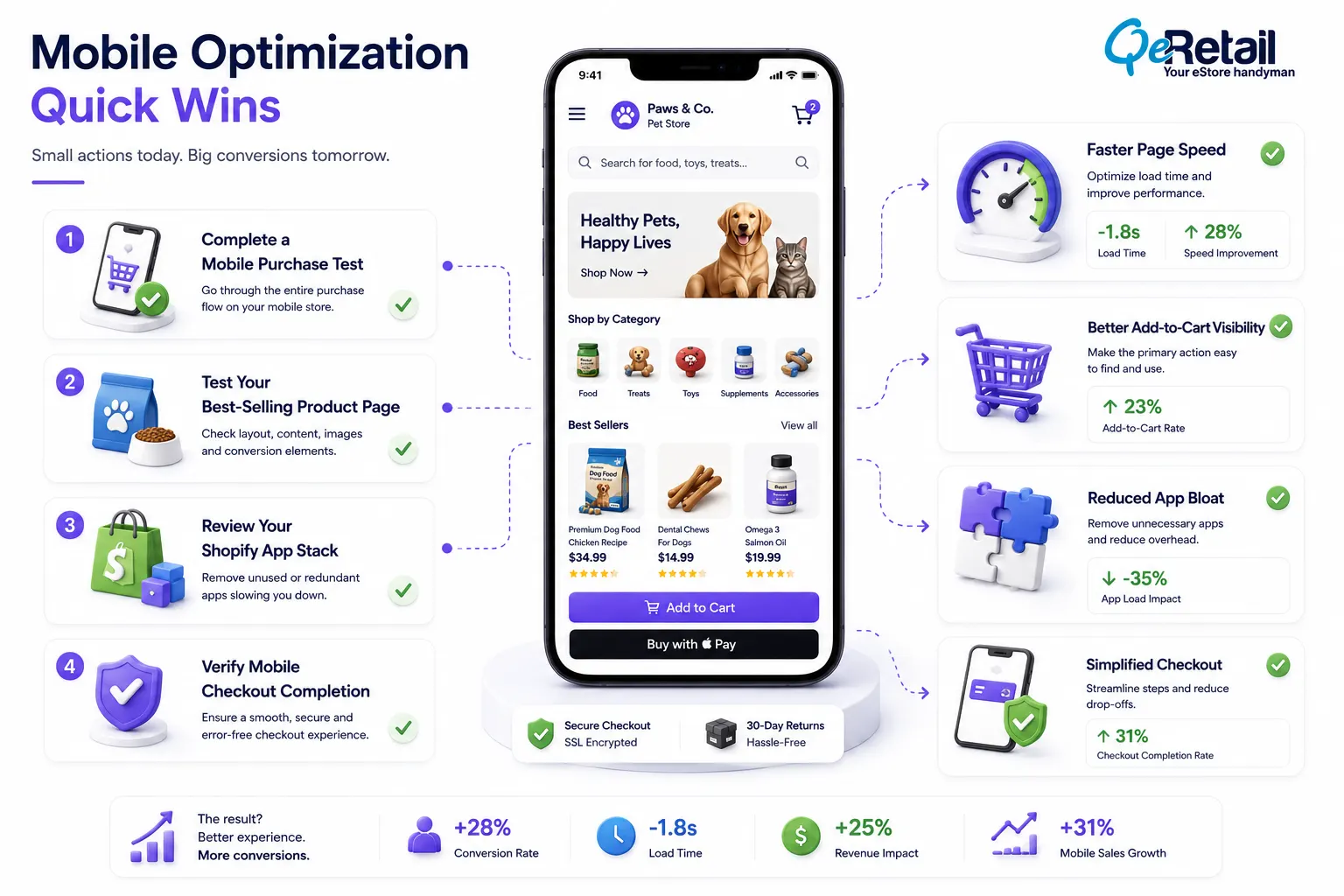
1. Complete a Purchase Using Your Own Phone
Browse your store and complete the checkout process after adding products to the cart using cellular data other than Wi-Fi for a grounded reality check and spot any mobile friction.
2. Test Your Best-Selling Product Page
Load your highest-performing product on multiple mobile devices. Pay attention to image loading, variant selection, and add-to-cart visibility.
3. Review Your App Stack
Many Shopify pet stores accumulate apps over time. Every unnecessary app adds potential performance overhead. Remove tools that no longer provide measurable value.
4. Check Mobile Checkout Completion
Complete a test purchase using Shop Pay, Apple Pay, Google Pay, and standard checkout. Compare the number of steps required for each path.
7 Things to Check on Your Shopify Pet Store’s Mobile Experience Right Now
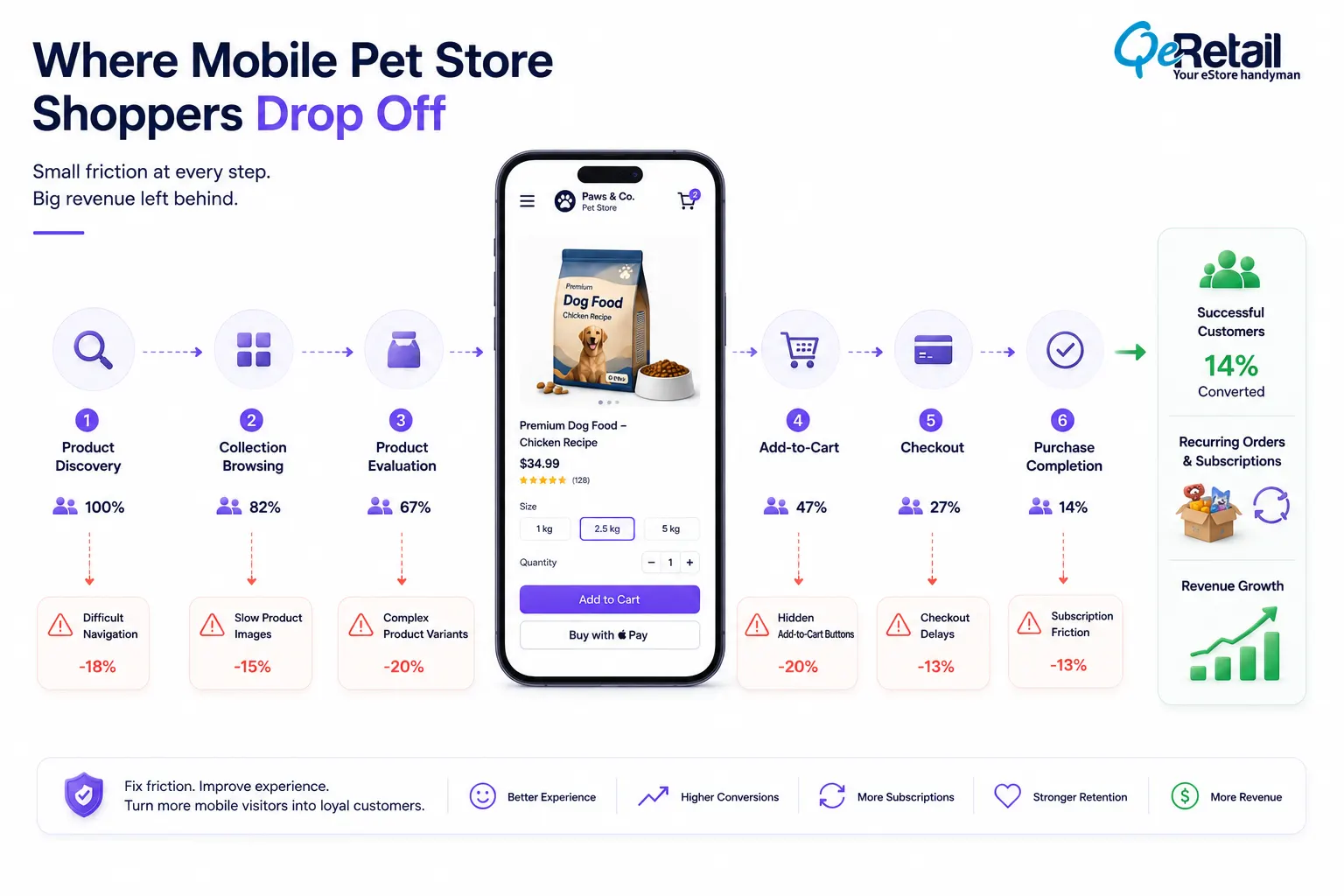
1. Is Your Add-to-Cart Button Visible When Purchase Intent Is Highest?
Most of the time, pet owners arrive with a pre-determined product list.
They don’t browse extensively like customers browsing stores related to lifestyle and fashion.
So, you need to offer a user experience where customers can act immediately as soon as they find the right product.
What mistakes Shopify pet stores make is that they place multiple elements ahead of the primary purchase action, which weakens the purchase momentum of the users. For example, placing unwanted reviews, educational content, promotional banners, and other elements that hinder the checkout process can frustrate customers.
Mobile screens magnify this problem because every additional scroll introduces opportunities for distraction.
What Steps Should Shopify Stores Take?
- Implement sticky add-to-cart functionality
- Reduce excessive content above purchase actions
- Prioritize product information hierarchy
- Improve button visibility and tap targets
Quick Win
Open your top five product pages on a mobile device, and if you cannot see an add-to-cart option within the first screen view, reorganize the page layout.
2. Are Product Variants Creating Mobile Decision Fatigue?
Pet products frequently involve more buying decisions than other eCommerce categories.
Managing the checkout process on mobile can be overwhelming compared to desktop because there are multiple factors that are taken into consideration by customers before beginning the final checkout process.
The technical challenge is not simply reducing options. It is designing selection flows that progressively reveal choices without overwhelming customers all at once.
Large variant sets also increase frontend rendering complexity. Poorly optimized variant scripts can delay interaction readiness and create noticeable lag when customers switch between options.
What Steps Should Shopify Stores Take?
- Simplify variant presentation
- Use progressive option selection
- Preselect popular configurations
- Optimize variant-loading scripts
Quick Win
Simplify the product selection process and remove unnecessary complexity to make the customer take fewer than 5 decisions before reaching the add-to-cart button.
3. Are Product Images Slowing Mobile Performance?
Pet products depend heavily on visual trust, but it doesn’t mean you prioritize image quality over store performance and user experience.
Oversized images in the store directly impact the page loading time. For example, having 10 high-resolution images on a single page can easily exceed several megabytes before additional scripts and apps even begin loading.
Placing an image of more than the required resolution adversely affects user experience and performance metrics.
Such delays in page loading increase the risk of cart abandonment and customer churning.
What Steps Should Shopify Stores Take?
- Convert images to WebP format
- Optimize image dimensions
- Review lazy-loading behavior
- Reduce unnecessary media assets
Quick Win
Compress your twenty most-viewed product images and convert them to WebP. This single optimization often delivers immediate mobile speed improvements.
4. Is Mobile Navigation Making Products Harder to Find?
As pet stores grow, product catalogs become increasingly complex.
Food categories expand. Supplements multiply. Breed-specific products emerge. Seasonal collections appear. Navigation structures that once worked become difficult to manage.
The challenge is not only menu design.
Many stores create navigation systems that force customers through multiple layers before reaching relevant products. Every additional click introduces friction and increases abandonment risk.
Along with navigation it is important to have a satisfying search functionality because poor search experiences often create invisible revenue loss.
What Steps Should Shopify Stores Take?
- Simplify category architecture
- Improve mobile search functionality
- Reduce navigation depth
- Optimize collection organization
Quick Win
Count the number of taps required to reach your best-selling product from the homepage. If it takes more than three interactions, simplify the path.
5. Are Subscription and Reorder Flows Frustrating Mobile Users?
Recurring revenue drives growth for many pet brands.
Food, supplements, treats, and wellness products naturally support repeat purchasing behavior. Yet many subscription experiences are designed around operational convenience rather than customer convenience.
Mobile shoppers expect subscription enrollment to feel effortless.
When subscription widgets load slowly, pricing calculations behave inconsistently, or frequency options become difficult to manage, customers often abandon the purchase entirely.
Subscription technology also introduces additional JavaScript dependencies that can affect page speed and interaction readiness.
What Steps Should Shopify Stores Take?
- Simplify subscription enrollment
- Optimize subscription widgets
- Improve account management flows
- Streamline reorder experiences
Quick Win
Review your subscription setup using a mobile device. If enrolling in a subscription requires significantly more effort than making a one-time purchase, simplify the process.
6. Is Your Mobile Checkout Creating Hidden Friction?
Many Shopify stores focus heavily on storefront optimization while overlooking checkout behavior.
The reality is that even high-intent customers abandon purchases when checkout feels unnecessarily difficult.
Mobile checkout friction often appears through form validation issues, auto-fill failures, payment method limitations, delayed field rendering, and excessive information requirements.
These problems rarely show up as platform errors.
Instead, they quietly reduce checkout completion rates.
For pet stores relying on repeat customers, every abandoned checkout represents both immediate revenue loss and potential lifetime value loss.
What Steps Should Shopify Stores Take?
- Enable accelerated payment methods
- Improve auto-fill compatibility
- Reduce form complexity
- Test payment options regularly
Quick Win
Complete a purchase using your phone today. Count how many times you need to manually type information. Every unnecessary field increases abandonment risk.
7. Are Performance Bottlenecks Delaying Customer Interactions?
A page may appear loaded while remaining functionally unusable.
This is one of the most misunderstood mobile performance problems in Shopify stores.
Customers see content, attempt to interact, and experience delays because JavaScript execution is still occurring in the background.
Common causes include excessive third-party apps, tracking scripts, review widgets, personalization tools, loyalty platforms, chat systems, and marketing integrations.
Individually, each tool seems harmless.
Collectively, they can create substantial interaction delays.
For mobile shoppers, responsiveness matters as much as load speed.
What Steps Should Shopify Stores Take?
- Audit third-party scripts regularly
- Remove unused app dependencies
- Prioritize critical rendering paths
- Monitor interaction readiness metrics
Quick Win
Open Chrome DevTools and review Total Blocking Time and Interaction to Next Paint metrics. These often reveal performance problems that traditional speed tests overlook.
How QeRetail Helps Shopify Pet Brands Improve Mobile Conversion Performance?
Many Shopify pet stores focus on driving more traffic when the larger opportunity often lies in improving how existing mobile visitors experience the store.
QeRetail helps pet brands identify where mobile conversion journeys weaken, where technical bottlenecks affect customer behavior, and where performance improvements can create measurable revenue impact.
Mobile Conversion Analysis
We evaluate how customers interact with product pages, collections, subscription flows, carts, and checkout experiences across mobile devices.
Shopify Performance Optimization
Our team identifies frontend bottlenecks, script conflicts, image inefficiencies, and mobile performance issues affecting conversion quality.
Customer Journey Improvement
We help simplify buying paths, reduce friction, and strengthen mobile purchase confidence.
Conversion-Focused Technical Reviews
Our recommendations prioritize business outcomes by focusing on improvements that directly affect add-to-cart activity, checkout completion, and customer retention.

Conclusion
Mobile commerce continues to reshape how customers shop for pet products.
The challenge is that many conversion issues remain invisible until revenue growth begins slowing. Customers rarely report friction. They simply leave.
By reviewing mobile usability, performance, checkout behavior, navigation structure, and subscription experiences regularly, Shopify pet brands can uncover opportunities that directly improve conversion efficiency.
QeRetail helps Shopify stores strengthen mobile experiences through technical optimization, customer journey improvements, and conversion-focused execution designed for long-term growth.
If your pet store attracts mobile traffic but struggles to convert it consistently, contact us.
Frequently Asked Questions
Why Do Pet Stores Often Experience Lower Mobile Conversion Rates?
Pet stores frequently manage large catalogs, subscription programs, and complex product variations, all of which can introduce mobile friction when not properly optimized.
How Important Is Mobile Speed for Shopify Pet Stores?
Mobile speed directly affects engagement, add-to-cart activity, checkout completion, and advertising performance. Even small delays can reduce conversion rates.
Should Subscription Products Be Optimized Differently for Mobile?
Yes. Subscription enrollment should require minimal effort and remain visually simple on smaller screens to prevent abandonment.
How Often Should Shopify Pet Stores Review Mobile Performance?
Quarterly reviews are recommended, especially after theme updates, app installations, major campaigns, or catalog expansions.
What Mobile Issue Affects Shopify Conversions Most Frequently?
The most common problems are slow interaction readiness, difficult navigation, hidden purchase actions, and checkout friction caused by excessive complexity.
Table of Contents