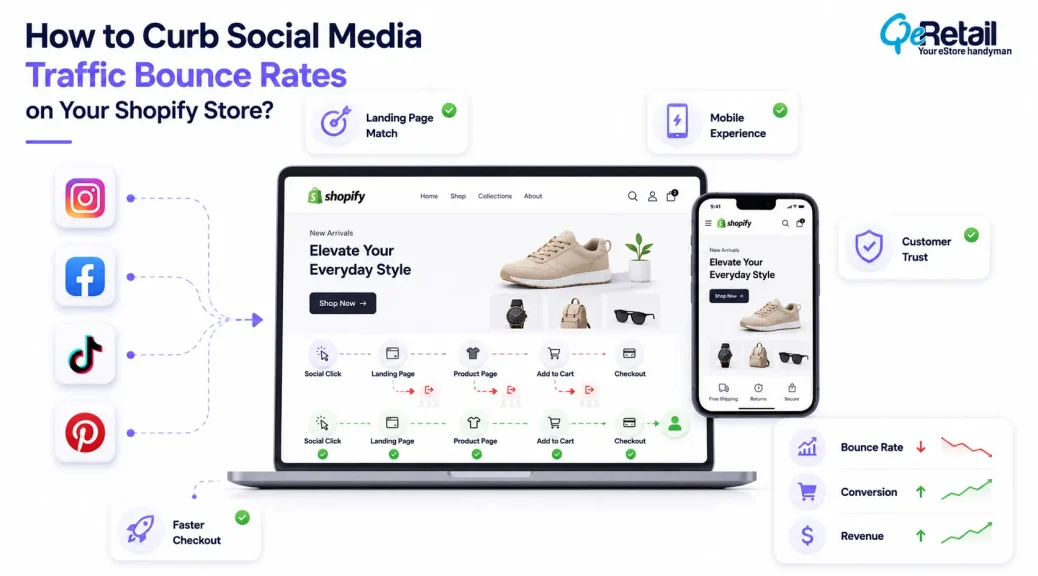
Social media platforms are powerful medium to offer massive visibility to your brand. A well-planned collaboration or paid campaign can help you navigate targeted audience to your store or social media account.
It can either help you have better sales or brand awareness or increased traffic. But Shopify store owners need to understand that increased traffic does not guarantee a high conversion rate. To capitalize the store traffic they need to put efforts and implement certain strategies.
The issue is often not the quality of the traffic itself. The problem is what happens after the click.
Unlike search traffic, social visitors usually discover brands while browsing. Because they are here due to random scrolling, in such scenario stores have a shorter window to translate window shopper into a buyer.
For example, a visitor navigated from social media wants to continue his or her journey from the post from where he/she landed here. And if the visitor feels disconnection between your landing page and post that made them click, they will bounce back instantly. And not just disconnection, if they feel slow loading speed and unnecessary friction, they will bounce back without thinking for a second.
According to Google’s research on mobile experiences, users are more likely to leave when pages are slow or difficult to interact with, especially in mobile-first environments.

Key Action Points Summary
Before optimizing social traffic performance, review these areas:
- Match landing pages with social campaign intent
- Improve first-screen product clarity
- Optimize mobile storefront experience
- Reduce unnecessary page distractions
- Strengthen trust for first-time visitors
- Simplify product discovery journeys
- Review page speed from social devices
- Analyze visitor behavior by traffic source
- Improve product page relevance
- Track social visitors beyond clicks
Quick Wins: Improve Your Social Traffic Experience First
Before making major storefront changes, start with these practical improvements.
1. Review Your Highest Traffic Social Landing Pages
Open and review your analytics to identify which pages receive the most visitors.
Check whether these pages immediately communicate:
- What the product offers
- Who the product is designed for
- What action visitors should take next
Result: Better alignment between customer expectations and storefront experience.
2. Test Your Store Through a Real Social Click
Many merchants review their store from desktop browsers but overlook the actual customer journey.
Open your Shopify store from a mobile device through a social platform link.
Review:
- Loading experience
- Product visibility
- Navigation flow
- Checkout accessibility
Result: More accurate understanding of real visitor behavior.
3. Remove One Conversion Distraction
Review your social landing pages and identify unnecessary elements competing with purchase decisions.
Examples:
- Multiple popups
- Excessive banners
- Too many promotional messages
Result: A cleaner path from discovery to purchase.
Why Social Media Visitors Bounce Differently From Other Shopify Traffic?
The user-behavior difference of visitors from social media and search engines are different. The social media user was on the platform for a different reasons and such user came across your brand or store campaign or post accidentally.
While, search engine traffic visitors are those who searched for the product related your brand and has some intentions behind making that search.
This creates a different conversion challenge.
The Shopify store must quickly answer the questions that appear after discovery:
Is this product relevant?
Can I trust this brand?
Why should I buy from here?
If these questions are not addressed satisfactorily as soon as visitor arrives on the store, there is a high chance of them leaving the store without any interaction.
Across our analysis of Shopify customer journeys, we noticed that first-time social visitors required stronger reassurance compared with returning customers. Stores that surfaced product credibility, policies, and customer proof earlier created fewer uncertainty points during the buying journey.
For Shopify brands, improving social bounce rates requires understanding the transition between attention and purchase intent. The storefront should not only receive visitors; it should continue the customer journey started on social platforms.
7 Ways to Reduce Social Media Traffic Bounce Rates on Your Shopify Store
1. Create Landing Experiences That Match Social Intent
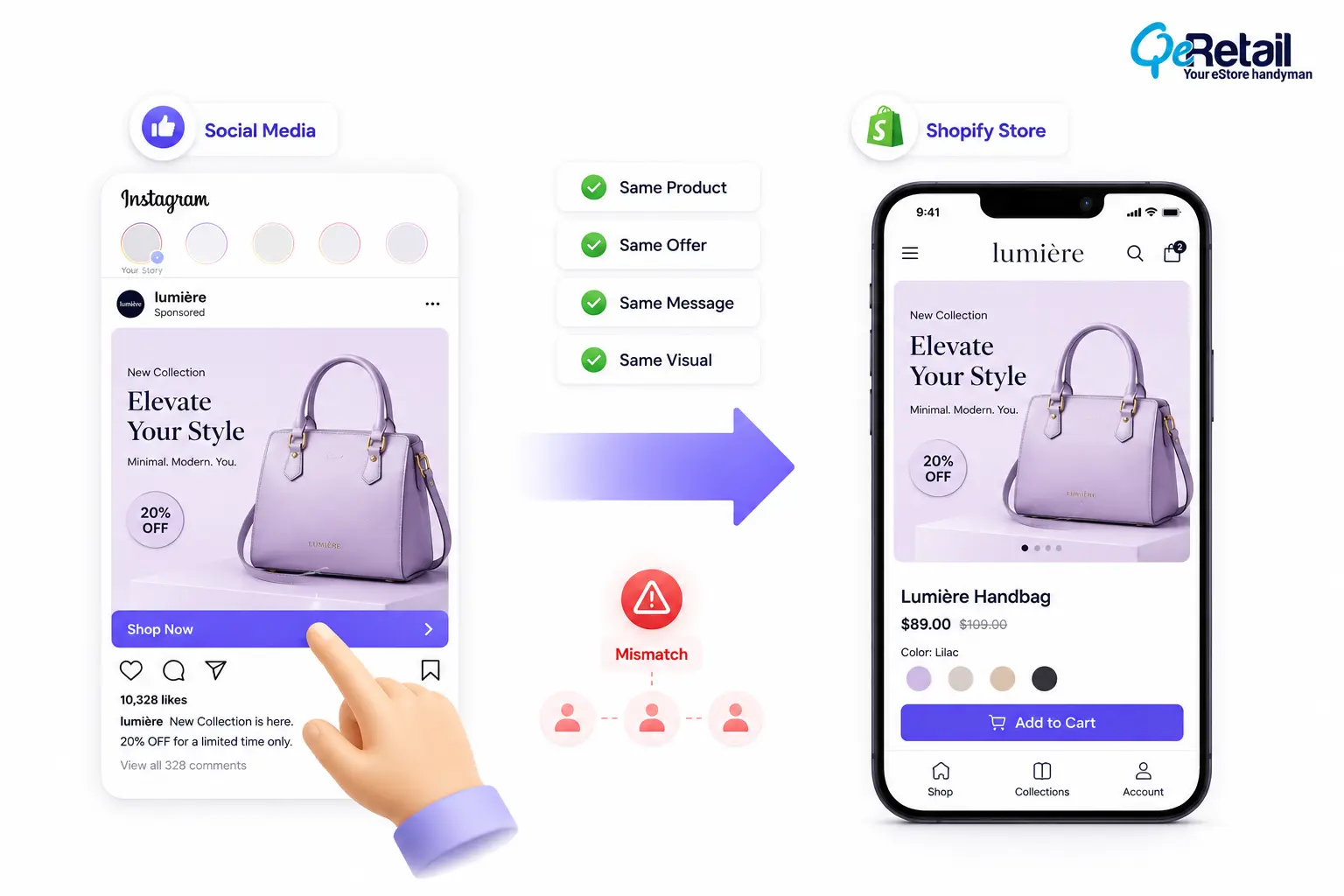
It is quite obvious that visitors will leave the page if there is no connection between the post they interacted with on the social media and the page they are getting landed to.
For example, a customer may click a product video showing a specific item but arrive on a generic homepage where they need to search again.
Social visitors respond better when the transition feels connected. Store owners and stakeholders need to be cautious about alignment between product, offers, and message on social media content and the store page.
During performance reviews of 27 Shopify stores across fashion, pet care, beauty, and lifestyle categories, we consistently observed that stores receiving significant social traffic often struggled more with bounce rates than search-driven traffic. In most cases, the issue was not traffic quality but the disconnect between campaign messaging and the storefront experience.
What Improvements Do Shopify Stores Need To Make?
- Create campaign-specific landing pages
- Send visitors directly to relevant products
- Match visuals between ads and storefronts
- Avoid sending all social traffic to the homepage
Quick Wins:
Take your best-performing social post and create a dedicated Shopify landing page around that specific audience intent instead of using a general product page.
2. Improve First-Screen Product Communication
Social visitors usually make quick decisions because they are coming from a high-distraction environment. If they cannot immediately understand what the product does or why it matters, they are more likely to leave.
Many stores focus heavily on design but overlook clarity.
A visually attractive page still needs to communicate value quickly.
What Improvements Do Shopify Stores Need To Make?
- Highlight the main product benefit immediately
- Make pricing and offers visible
- Show important product details above the fold
- Keep primary actions easy to find
Quick Wins:
Review your mobile homepage or landing page for five seconds without scrolling. If the value proposition is unclear, simplify the opening section.
3. Optimize Shopify Mobile Experience for Social Visitors
Most social traffic comes from mobile devices, making mobile performance a major factor in bounce rate.
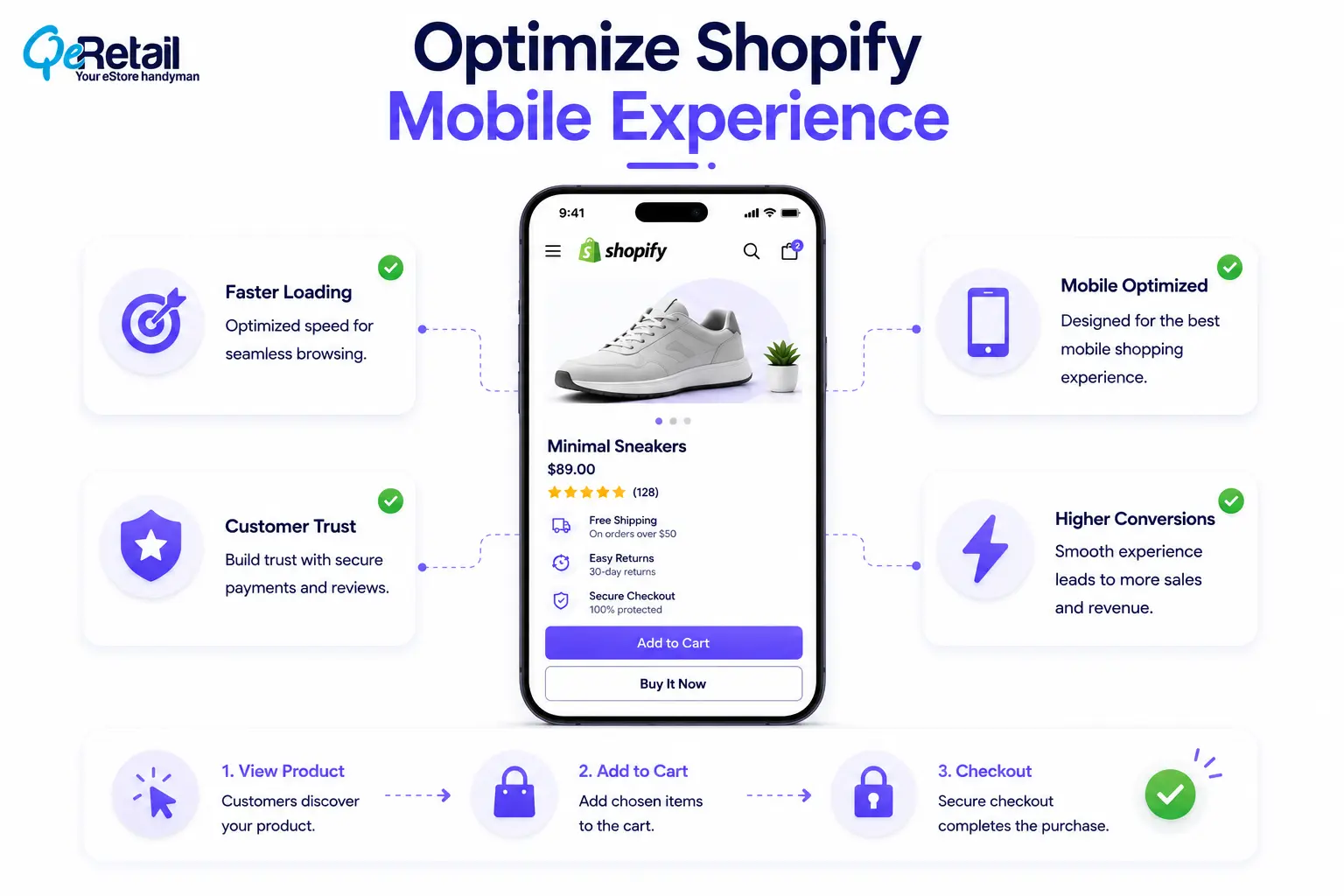
Small issues that appear minor on desktop become more noticeable on mobile.
Examples include slow-loading sections, difficult navigation, small buttons, and excessive scrolling before customers reach product information.
Google’s Core Web Vitals research highlights that user experience signals such as loading speed, responsiveness, and visual stability influence how users interact with websites.
What Improvements Do Shopify Stores Need To Make?
- Improve mobile loading performance
- Reduce unnecessary animations
- Optimize images and media files
- Test pages on real devices
Quick Wins:
Open your store using mobile data instead of Wi-Fi and complete the journey from landing page to checkout. Real conditions often reveal hidden friction.
4. Build Trust Faster for New Social Visitors
Social traffic often contains a high percentage of first-time visitors.
Unlike returning customers, these shoppers have no previous relationship with your brand. They need stronger reassurance before making a purchase decision.
Trust signals become especially important because visitors are evaluating whether your store feels reliable.
What Improvements Do Shopify Stores Need To Make?
- Add customer reviews near buying decisions
- Highlight shipping and return information
- Show payment security indicators
- Make support access visible
Quick Wins:
Move one important trust element closer to your product purchase area. Reducing uncertainty at the decision point can improve confidence.
5. Simplify the Journey From Product Discovery to Purchase
Social visitors usually have limited patience for complicated buying journeys.
Every additional step between landing and checkout creates another opportunity for customers to leave.
Common friction points include unclear navigation, hidden product information, and unnecessary decision points.
The objective is not to remove every step. It ensures every step helps customers move forward.
What Improvements Do Shopify Stores Need To Make?
- Reduce unnecessary clicks
- Improve product discovery flow
- Make purchase actions clear
- Remove unnecessary navigation barriers
Quick Wins:
Count the number of clicks required from your social landing page to checkout. Review whether each step is necessary.
6. Personalize Experiences Based on Social Traffic Sources
Not all social visitors behave the same way.
A customer arriving from a creator recommendation may have different expectations compared with someone clicking a discount advertisement.
When Shopify stores treat every visitor the same, they lose opportunities to improve relevance.
Understanding traffic source behavior allows brands to create more effective customer journeys.
What Improvements Shopify Stores Need To Make?
- Analyze conversion by social channel
- Create relevant landing experiences
- Adjust messaging based on audience intent
- Review customer behavior patterns
Quick Wins:
Compare performance between your top social platforms. Identify which audience converts better and optimize that experience first.
7. Analyze Why Social Visitors Exit Your Store
Bounce rate shows that visitors leave, but it does not explain why.
A customer may leave because the product was unclear, the page was slow, the offer was not relevant, or trust was missing.
Understanding the reason behind exits is more valuable than only tracking the number.
Shopify merchants should combine analytics with behavioral insights to identify repeated friction patterns.
What Improvements Shopify Stores Need To Make?
- Review landing page analytics
- Monitor customer journeys
- Analyze exit points
- Compare social and non-social visitors
Quick Wins:
Review your top exit pages from social traffic and identify one repeated friction point. Fixing one major issue is often more valuable than making multiple small changes.
How QeRetail Helps Shopify Stores Improve Social Traffic Conversion?
Improving social traffic performance requires more than increasing clicks.
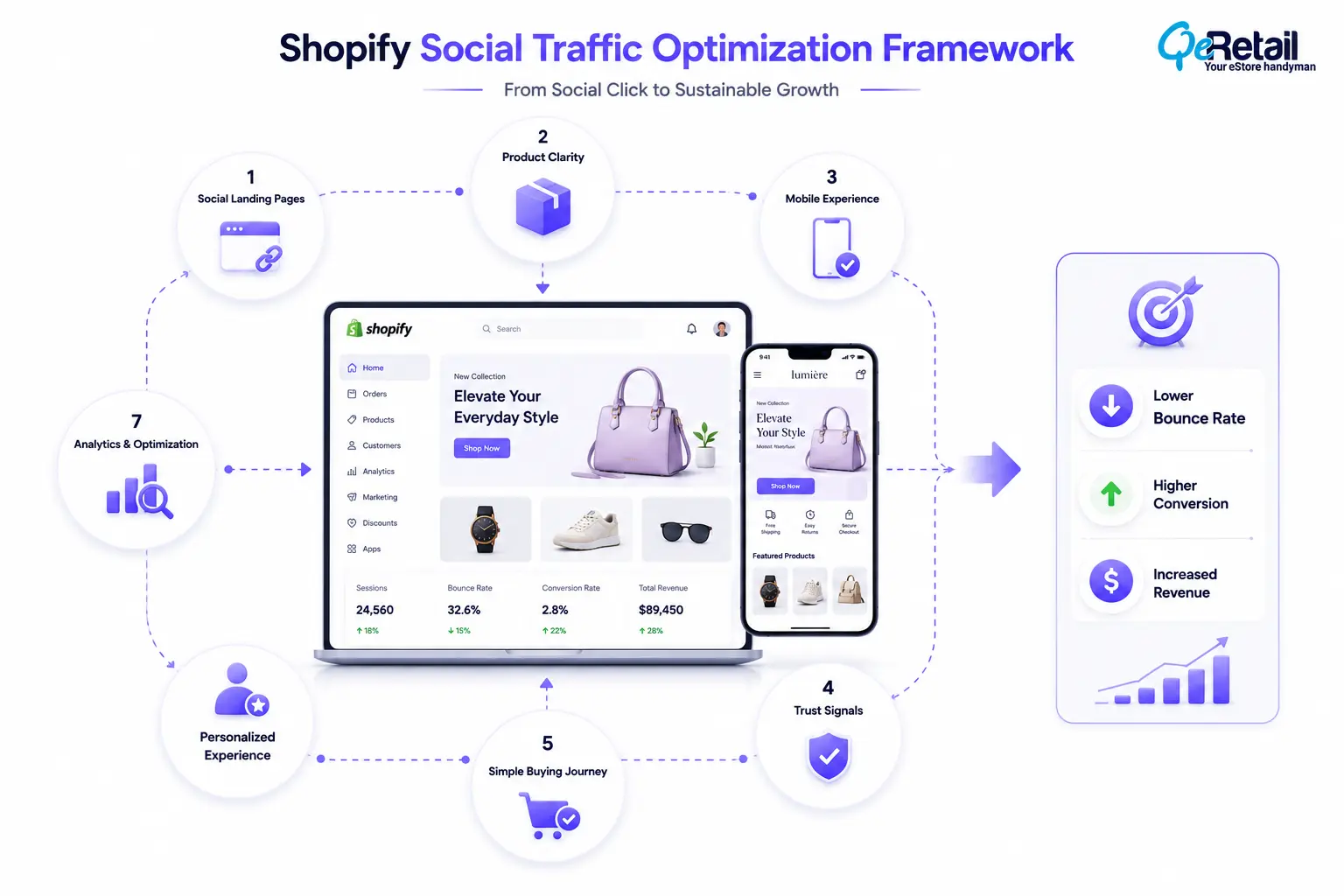
The Shopify experience after the click determines whether visitors become customers.
QeRetail helps Shopify brands analyze the connection between acquisition channels, storefront experience, and conversion performance.
Social Traffic Journey Analysis
We evaluate how visitors move from social platforms into product discovery, cart actions, and checkout.
Shopify Landing Page Optimization
Our team reviews landing experiences to improve relevance, usability, and conversion opportunities.
Mobile Experience Improvements
We identify mobile-specific issues affecting social visitors and purchase behavior.
Conversion-Focused Store Optimization
We focus on improving the complete customer journey rather than optimizing individual pages in isolation.
The objective is to help Shopify stores turn social attention into measurable business outcomes.

Conclusion
Social media gives Shopify brands an opportunity to reach customers before they actively search for products. However, that opportunity depends on what happens after the visitor arrives at the store.
A strong social strategy requires more than engaging content. The storefront must continue the same experience through relevance, trust, usability, and a clear purchase path.
Shopify brands that optimize the transition between social discovery and buying intent are better positioned to improve conversion efficiency and maximize the value of every visitor.
QeRetail helps Shopify businesses improve storefront experiences, optimize customer journeys, and build stronger connections between acquisition channels and revenue growth.
If your social campaigns generate traffic but not enough sales, contact us.
Frequently Asked Questions
Why Does My Shopify Store Get Social Media Traffic But No Sales?
How Can I Reduce Bounce Rate From Instagram Traffic?
Does Social Media Traffic Convert Differently From Google Traffic?
Should Shopify Stores Create Separate Landing Pages For Social Campaigns?
How Do I Measure Shopify Social Traffic Performance?
Table of Contents