Did you know that more than half (58%) of the customers visiting your auto parts store are doing it from their phones?
Despite this, customers are nearly twice as likely to actually buy something when they use a computer. Why? Because most online auto parts stores are designed for desktop computers, making them frustrating to use on a mobile phone.
This is exactly why specialized approaches, like mobile-first automotive solutions, are critical for fixing these hidden leaks and turning mobile traffic into actual sales.
You are paying for ads to get mobile shoppers to your site, only to lose them because your website is hard to tap, slow to load, or confusing.
Here are six common mistakes that are quietly draining your profits and how to fix them.
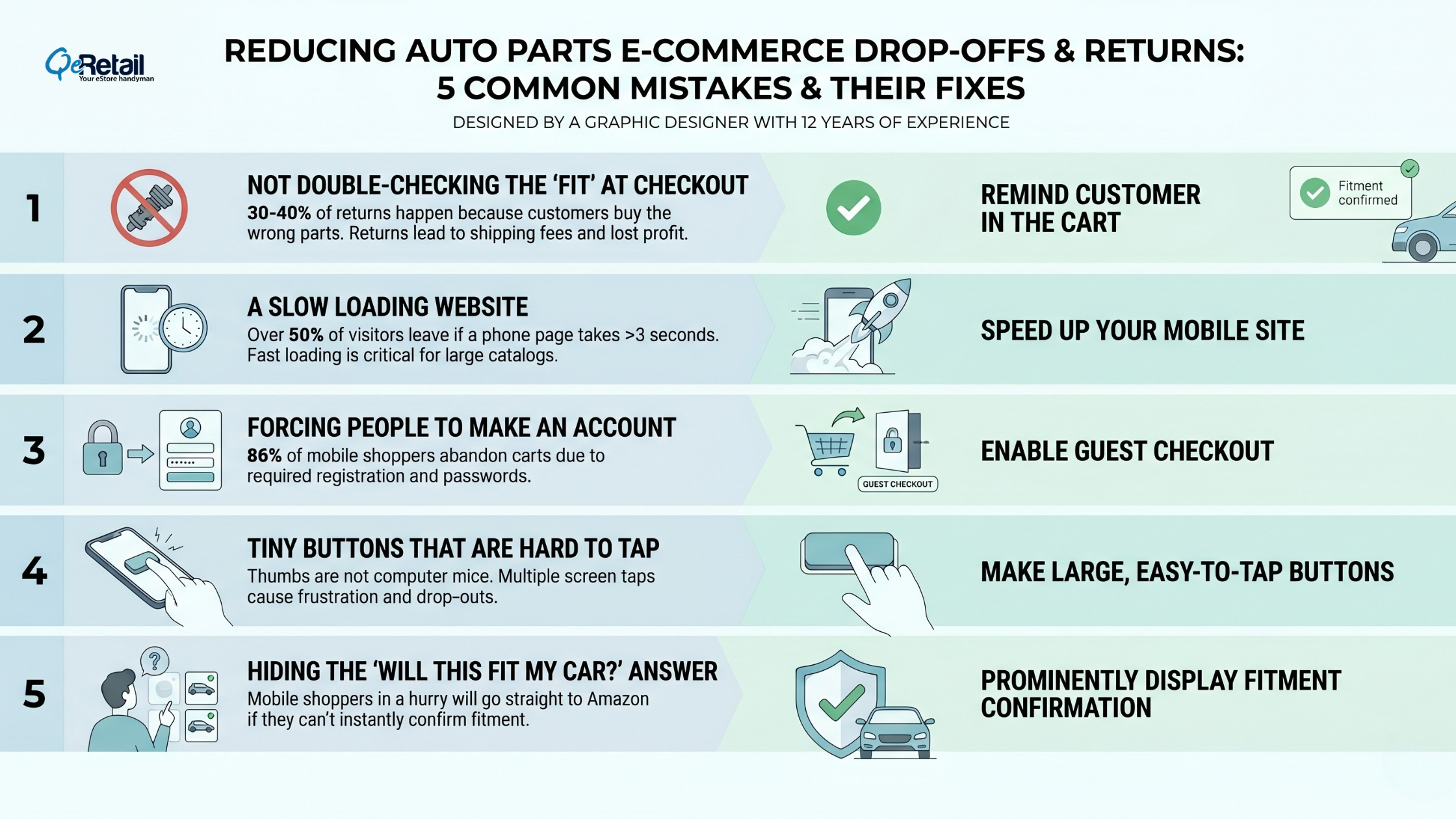
Six Common Mistakes Quietly Draining Your Profits and How to Fix Them
Mistake 1: Clunky “Year-Make-Model” Dropdowns
A “Year-Make-Model” search bar that works great with a computer mouse is often a nightmare to tap on a small phone screen. If a customer has to fumble and mistype four times just to select a 2018 Chevy Silverado, they will leave before they even see your products.
The Fix: Make your vehicle search feature big, tap-friendly, and designed specifically for thumbs.
Mistake 2: Not Double-Checking the “Fit” at Checkout
In the auto parts world, 30% to 40% of returns happen simply because the customer bought the wrong part for their car. Every return costs you shipping fees, lost profits, and a frustrated customer who won’t come back.
The Fix: Don’t just check if the part fits on the product page. Remind the customer in their shopping cart: “Yes, this fits your [Vehicle]!” before they pay.

Mistake 3: A Slow Loading Website
If your website takes more than 3 seconds to load on a phone, over half of your visitors will simply close the window and leave. Auto parts stores have a lot of images and huge product lists, which can cause standard Shopify themes to freeze up.
The Fix: Speed up your mobile site. You pay for every click from your ads if the page doesn’t load, you are throwing that ad money in the trash.
Mistake 4: Forcing People to Make an Account
Almost 86% of mobile shoppers abandon their carts before buying. One of the biggest reasons? Being forced to create an account and remember a new password just to buy a part.
The Fix: Turn on “Guest Checkout.” Let them buy the part quickly, and ask if they want to save their details to create an account after they have already paid you.
Mistake 5: Tiny Buttons That Are Hard to Tap
Thumbs aren’t computer mice. If your “Add to Cart” button is tiny, or if it takes five different screen taps just to buy one item, people will give up.
The Fix: Make sure your buttons are large, easy to read, and easy to tap with one hand while holding a phone.
Mistake 6: Hiding the “Will this fit my car?” Answer
Mobile shoppers are usually in a hurry. If they can’t instantly tell if a part fits their specific car, they will go straight to Amazon instead.
The Fix: Put a big, clear badge right next to the product picture that says, “Fits your 2018 Silverado.” Certainty gets you the sale; doubt loses it.
3 Quick Wins You Can Implement Today (No Coding Required)
Before you hire a developer or overhaul your site, here are four fast changes you can make in your Shopify dashboard right now to stop losing mobile sales:
- Enable Guest Checkout in 60 Seconds: Go to your Shopify Settings, click on “Checkout,” and set customer accounts to “Optional.” This instantly removes the biggest hurdle to mobile buying.
- Make Your Buy Buttons Bigger: Open your Shopify Theme Editor (Online Store > Customize) and look for your button settings. Increase the size and make sure your “Add to Cart” buttons span the full width of a mobile screen so they are impossible to miss.
- Shrink Your Image Sizes: Large images are the number one cause of a slow mobile site. Install a free or low-cost image compression app from the Shopify App Store to automatically reduce file sizes without sacrificing image quality.
The Bottom Line
You don’t need to completely rebuild your Shopify store. You just need to stop treating your mobile site like a shrunken-down desktop site. Fix your vehicle search, speed up your loading times, and make checkout easy. When you do, the money you are already spending on ads will bring in more orders and fewer returns.

FAQs
Why do automotive Shopify stores struggle on mobile?
While most people browse on their phones, they struggle to buy because of hard-to-use vehicle search bars, slow loading times, and forced account sign-ups.
How much do wrong-part returns really cost?
A lot. They make up 30-40% of all returns. You don’t just lose the sale and pay for return shipping; you usually lose that customer forever.
Does allowing “Guest Checkout” actually help?
Yes. Allowing customers to check out without creating an account is one of the easiest and fastest ways to increase your sales right now.
How fast should my website load on a phone?
Under 3 seconds. Any slower than that, and you start losing a massive chunk of your potential buyers.
Table of Contents